
Your cart is empty.
Keep shopping
Programming Fundamentals with Python 3 & Coding Exercises
2,049 students
Programming Fundamentals with Python 3 & Coding Exercises
Turn programming logic into Python 3 solutions with functions, files, OOP concepts and guided coding exercises.
Last updated 10/2026
English
English [Auto],
What you'll learn
- Trace variables, decisions and loops before translating an algorithm into Python.
- Use Python functions and files to separate processing steps and store results.
- Solve number-based coding exercises using explicit input and output expectations.
- Explain classes, methods and introductory object-oriented relationships.
- Summarise temperature readings in a practice lab and check boundary cases.
- Find an off-by-one error by tracing the first and last loop iterations.
Explore related topics
Coding Exercises
This course includes our updated coding exercises so you can practice your skills as you learn.
See a demo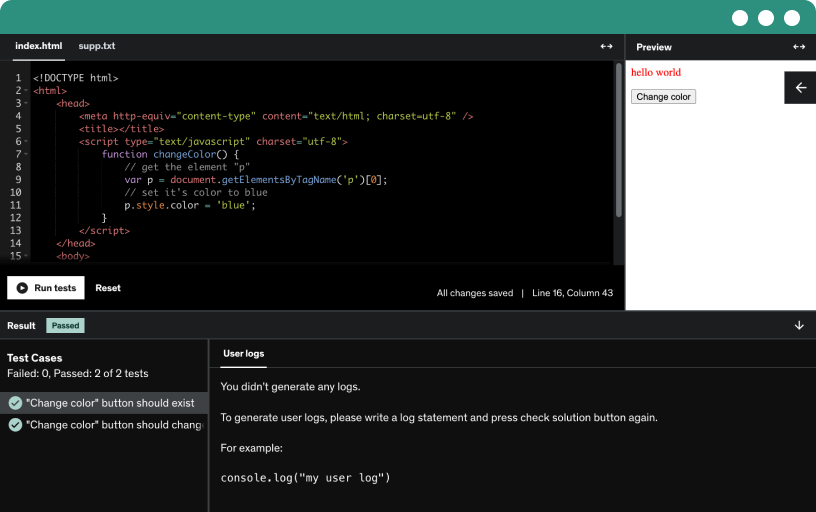
Course content
12 sections • 46 lectures • 5h 48m total length
Requirements
- No previous programming course is required. Basic skills in managing files and using a browser are enough to begin the logic sections.
- For the Python practice, use Python 3 and a suitable editor; the course includes Visual Studio Code material. You can trace an algorithm on paper before running it.
- Allow time to attempt each small exercise before reviewing a solution. Familiarity with basic arithmetic helps with number-based tasks, but advanced mathematics is unnecessary.
Description
Build programming logic first, then apply it in Python 3. This course connects general concepts with language examples and coding exercises, helping you turn a written requirement into steps that can be traced and checked.
The foundation lessons introduce variables, operators, conditions, loops, arrays, functions, files and object-oriented ideas. Python sections then demonstrate types, conversions and program flow. Additional topics include sending email, XML parsing and threading, giving you examples of where the fundamentals can lead.
What to practise
Break a small task into an input, a sequence of decisions and a result.
Trace the first and last iterations of a loop.
Move a repeated calculation into a function with a clear responsibility.
Use an ordinary case and a boundary case to examine an assumption.
The final reading labs translate a temperature-summary algorithm into Python and investigate an off-by-one error. Decide which readings count as valid, describe the empty-input result and use a small trace table before implementing the calculation. This gives you a concrete connection between an algorithm and the behaviour of its code.
This course suits beginners who want both programming concepts and a practical language in which to apply them, as well as returning learners refreshing their reasoning skills. Basic computer skills and time for independent practice are helpful.
The curriculum is broader than a single small script, so select a manageable route and revisit the foundations when later examples become difficult. Recorded tool and integration details may differ from current services and libraries; check official documentation before reproducing setup-dependent activities. Choose the course for structured fundamentals, problem-solving practice and a clear transition from explanation to Python.
Learning an algorithm before choosing syntax
This course begins with programming ideas and then applies them in Python 3. That structure is useful if you want to understand the process behind a solution rather than start by memorising statements. A task can be described through values, decisions, repetition and results before it is written in a particular language. The recorded lessons, coding exercises and reading labs give you different ways to examine that process. The aim is a broad foundation you can use for further practice, not instant expertise across every area of programming.
Variables as part of a model
A variable should stand for information relevant to the task. The opening sections introduce values, operators and types so that you can begin describing that model. Ask which information enters the program and which value represents progress or a result. If a type conversion is needed, explain its purpose. This makes the later Python syntax easier to understand because the value already has a role. A small example with clear meanings is a better starting point than a longer program filled with names whose responsibilities are unclear.
Decisions that divide the problem
Conditional logic lets a program respond differently to different inputs. Before writing an if-statement, identify the cases and the rule separating them. A positive or negative classification exercise, for example, requires an explicit decision about the values at the boundary. The course's small coding tasks make those choices visible. Predict the result before running a solution and explain why the case belongs where you placed it. This develops reasoning that remains useful when a later problem uses different names or a more complicated setting.
Repetition and the stopping rule
Loops express work that repeats, but their usefulness depends on a clear progression. Identify the starting value, the repeated operation and the condition that ends the sequence. A numerical exercise can expose a mistake in any of those parts. Trace a short version by hand so that you can compare it with execution. The point is not to avoid running code. It is to make running it an informative check of a prediction instead of a search for an answer you have not yet defined.
Functions, collections and files
These concepts introduce different kinds of organisation. A collection holds related values, a function groups a responsibility and a file preserves information beyond an immediate calculation. The course moves from general explanations into Python examples so that you can see those roles expressed in code. Give a function a clear input and result, then test it separately where possible. For a file operation, describe what information should be read or written. This keeps the program's behaviour understandable as more than one concept is combined.
Object-oriented vocabulary
Classes, objects, methods, encapsulation, inheritance and other relationships appear in the conceptual material. Use them to describe responsibility and interaction rather than to make a beginner exercise unnecessarily elaborate. What does an object represent? Which operation belongs to it? Which information should another part of the program need to know? A clear explanation of a small relationship provides a useful foundation. The course introduces these ideas without claiming exhaustive instruction in every Python design technique or large-application architecture.
Learning through the number-based exercises
The Python coding sequence includes small tasks involving sums, factorials, number classifications and digit-related calculations. Their value is that the expected result can often be checked independently. Attempt an exercise before reviewing the worked solution. Then compare the reasoning, not only the printed answer. Choose an input that tests an assumption, such as the start or end of a range. This gives a wrong result a specific meaning and helps you decide whether to revisit a condition, a loop or a function's contract.
The temperature-summary reading lab
The algorithm-to-Python workshop uses a small collection of readings to connect a stated process with code. Define what the input represents and what the summary should measure. Then compare a manually checkable result with the implementation. This makes the earlier lessons on variables, loops and functions work together around one purpose. The exercise is a reading lab, not a complete scientific data-processing package. Its strength is that the example is small enough to inspect and explain without hiding the rule inside a large toolchain.
Finding an off-by-one error
The second reading article focuses on tracing the first and last iterations. A loop can look familiar and still include one unwanted step or omit a required one. Writing those boundary states makes the issue easier to see. This is a useful complement to the numerical exercises because it asks you to inspect the progression directly. The wider curriculum also introduces topics such as email, XML and threading as extensions. Treat those as further areas to explore after the foundation is clear. Choose this course if you want a structured route from general programming logic to Python practice, with small examples that make your reasoning testable.
Curriculum at a glance
Variables
If-Statements and Conditional Logic
Loops and Iteration
Arrays
Functions & Files
Object-oriented Programming
Visual Studio Code
Applying what you learned in Python
Coding Exercises in Python 3
Sending emails, XML Parsing and Multithreading in Python
Who this course is for:
- You want to understand programming logic first and then apply it in Python 3 through short, checkable exercises.
- You are a student or adult beginner who needs practice with decisions, loops, functions, files and introductory object-oriented vocabulary.
- You learn by solving small number-based problems and comparing your reasoning with worked examples.
- You want to become more careful about boundaries and expected results, including the temperature-summary and off-by-one reading exercises.