
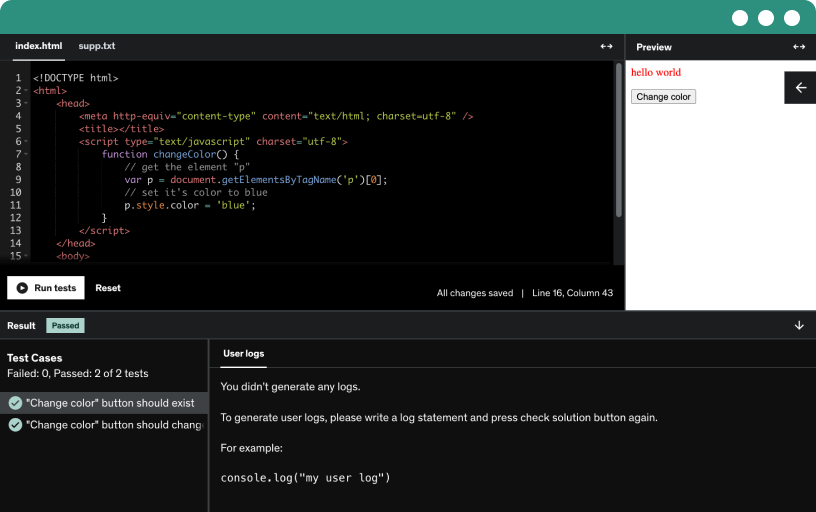
This course includes our updated coding exercises so you can practice your skills as you learn.
See a demo
Discover how a data analyst gathers, cleans, pre-processes, and visualizes real estate data using Python, from raw data to ready insights via API.
Master data analytics by learning Python essentials, pandas, NumPy, data manipulation, and visualization with Matplotlib and Seaborn. Apply skills to real-world data through gathering, cleaning, pre-processing, and analysis.
Discover who a data analyst is and how they create value by blending business and data analytics. Clarify terms like business intelligence, data science, and data analysis.
Define business as a for-profit activity and data as information; distinguish qualitative and quantitative data, and explain analysis versus analytics in guiding future decisions with BI and data science.
Compare the data analyst role with other data jobs, highlighting quantitative skills, statistics, mathematics, and programming. Understand how data analytics blends analysis to forecast outcomes and creates value across industries.
Learn how data analysts collect and clean data, pre-process, visualize, and analyze to extract insights that boost organizational performance, and communicate results to stakeholders.
Explore why Python is the go-to open-source, cross-platform, general-purpose language for data analysts, using Pandas, NumPy, Matplotlib, and Seaborn to collect, clean, preprocess, and visualize data.
Learn how to set up a Python coding environment with Jupyter. Gain a foundation in programming concepts, handle errors, and recover from blocks to work independently as a data analyst.
Learn how programming translates real-world problems into computer-executable code and why clear syntax, problem solving, and structured code style matter for reliable software.
Install Anaconda, which bundles Python and Jupyter, to run code in a browser using IPython notebook files (.ipynb). Jupyter connects language kernels with browser clients, enabling multi-language demos and training.
Learn how to install the Anaconda distribution on Windows, Mac, or Linux, including Python, Jupyter Notebook, and data science tools, and launch Jupyter via Anaconda Navigator.
Explore the Jupyter Notebook dashboard and manage folders, files, and notebooks. Learn how to upload, rename, and shut down kernels, and understand IPython and the ipynb format for workflow.
Navigate the Jupyter notebook dashboard and manage cells in command or edit mode. Execute cells with Ctrl and Enter, or Shift and Enter, and view input and output.
Master Jupyter shortcuts to speed coding by running cells with control or alt enter, entering command mode, and toggling markdown and code cells.
Learn to read and resolve Python and Jupyter error messages, identify name errors and typos, and use debugging and googling the error to find solutions.
Learn how to restart the kernel and clear outputs in Jupyter, and how to restart the kernel and run all cells from the beginning to ensure code runs in order.
Learn how to work with Python variables by assigning values (x = 5, y = 8), printing outputs, and understanding case sensitivity and multi-variable assignments in a practical coding warm-up.
Practice python with multiple coding exercises to solidify programming and analytical skills, while learning local versus browser coding and following the course order using provided resources.
Learn how Python distinguishes integers, floats, and booleans, and use the type function to confirm a value’s type. Understand that true and false must be written with capital letters.
Learn how Python handles strings with quotes and escapes, and how to print or combine numbers and text using str() and the plus operator.
Explore the Anaconda assistant, a generative artificial intelligence tool integrated with Python work that aids novice and intermediate users with code creation, explanation, and debugging.
Explore using the Anaconda assistant to work with Python strings, fix name errors by quoting text, and handle type errors when concatenating numbers with strings through debugging and step-by-step practice.
Explore basic arithmetic operators in python, including addition, subtraction, division, modulo, multiplication, and exponentiation; understand integer versus float results and python 2 vs 3 differences.
Explore how the double equals sign checks equality in Python, returning true or false, and distinguish it from assignment using y = 125 with practical examples.
Explore how Python syntax handles variable reassignment, showing that the last assignment overwrites earlier values as Z changes from 1 to 3 to 7.
Learn to document long Python code with comments. Use a hash at the start of each line, and know that comments do not execute.
Master Python line continuation by using backslashes to split long statements across lines, enabling clearer, scalable code for large codebases.
Master python indexing by extracting characters with square brackets and zero-based positions, demonstrated on 'Friday' to obtain the letter D, with applications in finance.
Master indentation as the core of Python syntax, using def to define a function and indentation to carve code blocks. See how print inside versus outside the function affects execution.
Master python comparison operators, including equality and not equal, and greater than or less than, using expressions like 10 plus 10. Preview the upcoming boolean operators.
Explore Python's logical and identity operators, including not, and, or, and is and is not, with true/false examples and comparison logic; learn operator precedence before diving into conditionals.
Learn how to use Python's if statements to control program output by evaluating conditions, using double equals for comparison, not equals for inequality, a colon, indentation, and print statements.
Master conditional statements using if and else to drive program outputs based on x, and learn proper indentation and blocks of code for the if and the else.
Learn to use the elif keyword to chain multiple conditional checks between if and else, and observe how the program controls flow to print greater, less, or equal.
Explore how boolean values power conditionals in Python, using an if else example where x > 4 prints correct and otherwise prints incorrect, showing how order of commands affects outcomes.
Learn how to define and call Python functions with def, name, and parentheses, specify zero or more parameters, use indentation, and print results after calling.
Learn to create a Python function with a parameter using def plus_ten with parameter a that returns a + 10, call it with various arguments, and distinguish return from print.
Explore a different approach to defining a function by creating an internal result variable, and distinguish print from return to reveal steps and yield the function’s output.
Nest a function inside another by defining wage and with_bonus; wage computes pay at $25 per hour, with_bonus adds $50, shown for eight hours.
combine conditional statements and functions by defining function add 10 that takes M, assigns M to M plus 10 when M >= 100, and returns a save more message otherwise.
Learn to work with multiple parameters in Python functions, using positional and keyword arguments to control order and reproduce the same result with a=10, b=3, c=2.
Learn how Python's built-in functions save you from typing their code, transform data types with int, float, and string, and use max, min, abs, sum, round, pow, and len.
Discover how Python lists function as sequences, create a participants list with square brackets and quotes, and practice zero-based indexing, replacing, and deleting items with assignment and the del keyword.
Learn how to manipulate lists in Python using built-in methods like append and extend, use the dot operator, and count elements with len to manage participant data.
Learn Python list slicing to extract sublists with indices like 1:3, use colon notation, and apply negative indexing, plus sorting and list of lists.
Explore tuples as immutable Python sequences and their distinction from lists. Illustrate tuple assignment, indexing, packing, and returning area and perimeter, including comma-separated values split by the split method.
Explore dictionaries in Python, using curly braces to store key-value pairs, access values by key, add or replace entries, and handle missing keys with the get method returning None.
Master iteration and for loops in Python by printing elements from an even numbers list, using a loop variable, proper indentation, and options to print on one line.
Learn to use a while loop to increment x by 2, print values up to 20, avoid infinite loops, and compare for vs while to ensure safe, correct results.
Learn to create lists with Python's range function, understand start, stop, and step, and see how range objects convert to lists with practical examples.
Explore Python iteration by using for loops with range and len to print power sequences and access list elements, and apply conditionals to print even numbers and label odd values.
Learn to use iterations to count list items under 20 by defining a function with a rolling total that increments when values are less than 20 and returns the count.
Explore the capabilities of the Anaconda Assistant to write and run a function that counts values below 20, rename variables, and compare loop structures while refining prompts for precise collaboration.
Iterate over dictionaries to compute how much Jan spent by multiplying prices by quantities, using a loop and a rolling sum for money spent.
Explore how the Anaconda Assistant explains dictionary-based code, adds comments, replaces selection, and refactors in notebook cells to improve readability while handling potential tool-related risks.
Explore object-oriented programming (OOP) concepts like objects, classes, attributes, and methods in Python, with lists and data types, and distinguish between methods and functions.
Explore how modules, packages, and the Python standard library accelerate coding by reusing pre-written code, importing modules, and leveraging ready-made data analysis tools.
Explore four ways to import the math module, including import math, from math import sqrt, sqrt as S, and from math import star, then apply sqrt to 25 and 64.
Learn to combine NumPy and pandas for efficient data analysis in Python. Import libraries with np and pd, manage versions via upgrades, and work in Jupyter notebooks.
Understand what software documentation is, why it's often technical, and how to read it effectively to become an independent user.
Learn how to access and navigate the Python documentation on Python.org, explore versions, FAQs, and quick search, and use Jupyter for on-the-fly method details like list.extend.
Explore matrices as two-dimensional collections of numbers in rows and columns, with elements labeled Aij in a two-by-three example, and note that many languages use zero-based indexing.
Identify scalars as zero-dimensional numbers and distinguish them from matrices and vectors. Define vectors as one-dimensional, with row and column forms, noting their length and X1...XM notation.
Explore how geometry underpins linear algebra by linking points, scalars, and vectors to a two-dimensional plane defined by a matrix; visualize examples like (2,5) and (-2,-5).
Explore declaring scalars, vectors, and matrices in Python with NumPy arrays. Learn to inspect ndarrays, check shapes, and reshape vectors into row or column forms.
Learn how TensorFlow uses tensors, from scalars and vectors to matrices and rank-three tensors, and see how ndarrays store multi-dimensional data.
Add and subtract matrices by adding corresponding entries when dimensions match, illustrated with two matrices and vector examples. Use Python's plus sign to perform these operations.
Explore how scalars differ from vectors and matrices, why addition requires matching shapes in linear algebra, and how Python allows scalar broadcasting to arrays in an elementwise way.
Learn the transpose of vectors and matrices, converting columns to rows and m-by-n to n-by-m, and note that values stay the same and transposing twice returns the original.
Explore how to multiply vectors via the dot product, including inner and scalar products, and apply NumPy's dot function to compute results like minus 66 from two given vectors.
Explore how dot products generalize to matrices, multiply compatible shapes to yield an m by k result, and use row and column vectors in matrix multiplication.
Discover how linear algebra powers data science through vectorized code, image recognition with CNNs, and dimensionality reduction, using matrix multiplication, NumPy, and tensor representations.
Explore NumPy, the numeric Python package, for fast, stable array operations, random data generation, and basic linear algebra, with broadcasting and typecasting to power data analysis.
Install or upgrade NumPy using pip in Windows or Mac, then import NumPy as np in a Python notebook and prepare to explore the nd array feature.
Explore NumPy's N-D array, the crown jewel of the package, and learn how 0D, 1D, and 2D arrays map to scalars, vectors, and matrices, with element-wise operations.
Learn to navigate the NumPy documentation to understand mean function syntax, parameters, returns, and examples, using the search bar and the NumPy user guide for quick access.
Practice browser-based Python coding with CSV sales data, manipulating a dataframe to apply a column order and use the axes attribute to compare labels, with print outputs and guided hints.
Explore the pandas library, its Series and DataFrame data structures, and how it speeds Python data analysis, handles missing values, and imports and exports diverse data formats.
Install and run pandas across Windows, macOS, and Linux using pip or conda and Anaconda, upgrade to the latest version, and use pd in Jupyter.
Create and inspect pandas series from lists and numpy arrays, understanding index and data types. Compare series to lists and arrays while emphasizing data consistency.
Explore how Python objects expose attributes and methods, focusing on Pandas series attributes like dtype, size, and name, and learn dot notation and basic assignment.
Explore pandas indexing by turning a dictionary into a series, where keys become index labels, and compare label-based with position-based indexing to speed data access.
Explore label-based and position-based indexing in pandas, distinguishing explicit versus implicit indexing, including range indices and zero-based position references.
Explore how to work with indices in Python's series objects, comparing label-based and position-based indexing, and learn to retrieve prices per category while avoiding common indexing pitfalls.
Learn to work with Python objects, attributes, and methods, compare methods to functions, and use Pandas Series methods like sum, min, max, idxmax, and idxmin to analyze data.
Explore pandas methods alongside NumPy-based operations, including head and tail, and learn when to use numeric vs non-numeric data for quick dataset previews and analysis.
Clarify the difference between parameters and arguments using pandas' head method on a start date deposits series, showing how to set defaults and explicit values to control displayed rows.
Explore the pandas documentation, especially the user guide, to learn how to access method details like series.sum, understand defaults, and use docs as a fast, practical reference for pandas programming.
Explore the pandas DataFrame, a two-dimensional tabular structure built from multiple Series with row and column labels, supporting heterogeneous column types and dictionary-like access for analysis.
learn to create dataframes from scratch in pandas using dictionary, index, and list of dictionaries, and compare six methods to build a dataframe for product data.
Explore methods to create a pandas DataFrame from dictionaries, lists, and Series, set data, columns, and index, and use shape to verify the result.
Review the pandas documentation and user guide to deepen your understanding of DataFrames and Series, and practice with the DataFrame constructor and related methods to become an independent pandas user.
Learn how Python handles text and binary files, including text data vs text files, end-of-line concepts, and how images can be stored as text data for analysis.
Differentiate between a file and a file object in Python. Differentiate between reading and parsing a text file, and import and store those as file objects for analysis in pandas.
Identify data structures and the three data types—structured, semi-structured, and unstructured. Focus on traditional structured data stored in tables, databases, or DataFrames for efficient access.
Explore how text files enable data connectivity, focusing on csv and json with Python. Compare plain text, rich text, and xlsx to support data cleaning and preprocessing.
Learn the essential concepts for importing text data in Python, including character encoding and UTF-8, separators, end-of-line and end-of-file, and how encoding affects data readability.
Compare plain text and flat files, explain separators and delimiters in csv, tsv, and dsv formats, and relate flat files to single-table relational databases.
Examine fixed-width files, a flat text format with fixed column widths, pad characters, and left or right alignment. Understand their rarity and preprocessing challenges, and prepare for importing in Python.
Adopt common naming conventions like UpperCamelCase, lowerCamelCase, snake_case, and kebab-case for code and file names, avoid spaces, and use concise, specific terms such as loan_price.
Learn to import text data into Python using open(), create a file object, read contents with read(), manage file paths, and safely close the file.
Learn to read and write text files in Python using with open() for safe automatic closure. Compare read and write modes and see how content is overwritten.
Import CSV data into a pandas DataFrame with read_csv, using your working directory and auto-complete tips, then verify data with basic inspection.
Learn how read_csv imports a csv into a data frame, uses header and 0-based indexing to set column names and the index, and that it can read txt files too.
Inspect the raw csv with a text editor to verify header, separator, and encoding (utf-8), then import with pandas read_csv into a DataFrame.
Learn how to import data with the read csv method by setting index_col to use LoanID as the index, replacing the default zero-based index and improving data manipulation.
Learn how to import text data in Python using NumPy's loadtxt and genfromtxt, compare performance, handle missing values, and choose the right delimiter for CSV files.
Learn how to import data with NumPy, perform light cleaning during import using skip header, skip footer, and usecols, and unpack columns into separate variables for efficient analysis.
In the upcoming exercises, we’ll be testing your ability to navigate the NumPy documentation. Specifically, please refer to the documentation for the np.genfromtxt() function and take a moment to briefly explore the following parameters:
comments
converters
missing_values
excludelist
deletechars
replace_space
autostrip
Don’t worry — you’re not expected to understand the full implementation or use each parameter in depth. The goal is simply to develop a basic idea of what each parameter does and how it might be useful.
For your convenience, a short description of each parameter is provided below.
Feel free to try them out in the code cell if you’d like.
Good luck and enjoy exploring!
Parameter Descriptions :
comments: The character used to indicate the start of a comment. All characters occurring on the same line after the comment character are discarded.
converters: A dictionary of functions that convert the data in a given column to a value. Converters can also be used to handle missing data by supplying default values — for example:
converters = {3: lambda s: float(s or 0)}
missing_values: A set of strings that represent missing data in the file.
excludelist: A list of names to exclude. This list is appended to the default list ['return', 'file', 'print']. Excluded names are modified by appending an underscore — for example, file becomes file_.
deletechars: A string of characters considered invalid in variable names; these will be deleted.
replace_space: Character(s) used to replace spaces in variable names. By default, spaces are replaced with an underscore (_).
autostrip: A boolean value that determines whether white space should be automatically stripped from variable names and data values.
Learn how JSON files work, why they're popular for NoSQL and web scraping, and how to import them into Python as dictionaries or pandas dataframes.
Learn how Excel handles csv files by converting comma delimited text into rows and columns using text to columns, and understand why saving as csv vs xlsx affects formulas and formatting.
Import Excel data into Python using the pandas read_excel method to read XLSX files. Compare with faster CSV and JSON workflows.
Learn to import data with pandas read_csv, pick specific columns with usecols, set string id as the index, and tweak sep or delimiter for clean results.
Learn how to convert a single-column data frame to a pandas series using the squeeze method, with read_csv and axis options, illustrated by the customer gender data.
Learn to import and export data in jupyter using pandas read_csv, handling files in the same or different directories, including path joining with os and path modules.
Learn how to export a pandas data frame to csv, json, and excel using to_csv, to_json, and to_excel, including how to set the file path and disable the index.
Learn how to save data with NumPy using np.save to create an NPY file from a Python array, importing NumPy and preparing CSV data for fast and compact loading.
Learn to save multiple arrays with np.savez, creating an NPZ archive from NPY data, load and access named datasets like company and data save, and verify integrity.
Learn how to save NumPy arrays to text files with np.savetxt, choosing .txt or .csv, selecting formats and delimiters, and comparing it to np.save and np.savez.
Explore the essentials of importing and exporting data with Python, and practice working with text files and databases as you encounter real-world raw data.
Explore how text data differs from text files and how to manipulate text in Python. Learn string formatting with the print function and argument specifiers like %s, %d, and %f.
Master manipulating Python strings using escape sequences such as \n for new lines, \t for tabs, and \r for carriage returns, and learn string concatenation and formatting through practical examples.
Explore Python string methods such as replace, startswith, endswith, and split, with hands-on examples like converting 'price' to 'cost' and splitting 'Cost per unit'.
Explore Python string methods that change case (upper, lower, capitalize, title) and those that strip characters (strip, lstrip, rstrip) with practical examples for cleaning data.
Learn to manipulate text in a pandas Series using the string accessor .str, applying lstrip and contains to clean data, handle non-string values, and ensure dollar signs on prices.
Learn how to use Python's format method to insert values into string templates via positional and keyword arguments, using placeholders with tuples, lists, and indexing.
The problem
Most data analyst, data science, and coding courses miss a critical practical step. They don’t teach you how to work with raw data, how to clean, and preprocess it. This creates a sizeable gap between the skills you need on the job and the abilities you have acquired in training. Truth be told, real-world data is messy, so you need to know how to overcome this obstacle to become an independent data professional.
The bootcamps we have seen online and even live classes neglect this aspect and show you how to work with ‘clean’ data. But this isn’t doing you a favour. In reality, it will set you back both when you are applying for jobs, and when you’re on the job.
The solution
Our goal is to provide you with complete preparation. And this course will turn you into a job-ready data analyst. To take you there, we will cover the following fundamental topics extensively.
Theory about the field of data analytics
Basic Python
Advanced Python
NumPy
Pandas
Working with text files
Data collection
Data cleaning
Data preprocessing
Data visualization
Final practical example
Each of these subjects builds on the previous ones. And this is precisely what makes our curriculum so valuable. Everything is shown in the right order and we guarantee that you are not going to get lost along the way, as we have provided all necessary steps in video (not a single one skipped). In other words, we are not going to teach you how to analyse data before you know how to gather and clean it.
So, to prepare you for the entry-level job that leads to a data science position - data analyst - we created The Data Analyst Course.
This is a rather unique training program because it teaches the fundamentals you need on the job. A frequently neglected aspect of vital importance.
Moreover, our focus is to teach topics that flow smoothly and complement each other. The course provides complete preparation for someone who wants to become a data analyst at a fraction of the cost of traditional programs (not to mention the amount of time you will save). We believe that this resource will significantly boost your chances of landing a job, as it will prepare you for practical tasks and concepts that are frequently included in interviews.
The topics we will cover
1. Theory about the field of data analytics
2. Basic Python
3. Advanced Python
4. NumPy
5. Pandas
6. Working with text files
7. Data collection
8. Data cleaning
9. Data preprocessing
10. Data visualization
11. Final practical example
1. Theory about the field of data analytics
Here we will focus on the big picture. But don’t imagine long boring pages with terms you’ll have to check up in a dictionary every minute. Instead, this is where we want to define who a data analyst is, what they do, and how they create value for an organization.
Why learn it?
You need a general understanding to appreciate how every part of the course fits in with the rest of the content. As they say, if you know where you are going, chances are that you will eventually get there. And since data analyst and other data jobs are relatively new and constantly evolving, we want to provide you with a good grasp of the data analyst role specifically. Then, in the following chapters, we will teach you the actual tools you need to become a data analyst.
2. Basic Python
This course is centred around Python. So, we’ll start from the very basics. Don’t be afraid if you do not have prior programming experience.
Why learn it?
You need to learn a programming language to take full advantage of the data-rich world we live in. Unless you are equipped with such a skill, you will always be dependent on other people’s ability to extract and manipulate data, and you want to be independent while doing analysis, right? Also, you don’t necessarily need to learn many programming languages at once. It is enough to be very skilled at just one, and we’ve naturally chosen Python which has established itself as the number one language for data analysis and data science (thanks to its rich libraries and versatility).
3. Advanced Python
We will introduce advanced Python topics such as working with text data and using tools such as list comprehensions and anonymous functions.
Why learn it?
These lessons will turn you into a proficient Python user who is independent on the job. You will be able to use Python’s core strengths to your advantage. So, here it is not just about the topics, it is also about the depth in which we explore the most relevant Python tools.
4. NumPy
NumPy is Python’s fundamental package for scientific computing. It has established itself as the go-to tool when you need to compute mathematical and statical operations.
Why learn it?
A large portion of a data analyst’s work is dedicated to preprocessing datasets. Unquestionably, this involves tons of mathematical and statistical techniques that NumPy is renowned for. In addition, the package introduces multi-dimensional array structures and provides a plethora of built-in functions and methods to use while working with them. In other words, NumPy can be described as a computationally stable state-of-the-art Python instrument that provides flexibility and can take your analysis to the next level.
5. Pandas
The pandas library is one of the most popular Python tools that facilitate data manipulation and analysis. It is very valuable because you can use it to manipulate all sorts of information - numerical tables and time series data, as well as text.
Why learn it?
Pandas is the other main tool an analyst needs to clean and preprocess the data they are working with. Its data manipulation features are second to none in Python because of the diversity and richness it provides in terms of methods and functions. The combined ability to work with both NumPy and pandas is extremely powerful as the two libraries complement each other. You need to be capable to operate with both to produce a complete and consistent analysis independently.
6. Working with text files
Exchanging information with text files is practically how we exchange information today. In this part of the course, we will use the Python, pandas, and NumPy tools learned earlier to give you the essentials you need when importing or saving data.
Why learn it?
In many courses, you are just given a dataset to practice your analytical and programming skills. However, we don’t want to close our eyes to reality, where converting a raw dataset from an external file into a workable Python format can be a massive challenge.
7. Data collection
In the real world, you don’t always have the data readily available for you. In this part of the course, you will learn how to retrieve data from an API.
Why learn it?
You need to know how to source your data, right? To be a well-rounded analyst you must be able to collect data from outside sources. This is rarely a one-click process. This section aims at providing you with all the necessary tools to do that on your own.
8. Data cleaning
The next logical step is to clean your data. This is where you will apply the pandas skills acquired earlier in practice. All lessons throughout the course have a real-world perspective.
Why learn it?
A large part of a data analyst’s job in the real world involves cleaning data and preparing it for the actual analysis. You can’t expect that you’ll deal with flawless data sources, right? So, it will be up to you to overcome this stage and clean your data.
9. Data preprocessing
Even when your dataset is clean and in an understandable shape, it isn’t quite ready to be processed for visualizations and analysis just yet. There is a crucial step in between, and that’s data preprocessing.
Why learn it?
Data preprocessing is where a data analyst can demonstrate how good or great they are at their job. This stage of the work requires the ability to choose the right statistical tool that will improve the quality of your dataset and the knowledge to implement it with advanced pandas and NumPy techniques. Only when you’ve completed this step can you say that your dataset is preprocessed and ready for the next part, which is data visualization.
10. Data visualization
Data visualization is the face of data. Many people look at the data and see nothing. The reason for that is that they are not creating good visualizations. Or even worse – they are creating nice graphs but cannot interpret them accurately.
Why learn it?
This part of the course will teach you how to use your data to produce meaningful insights. At the end of the day, data charts are what conveys the most information in the shortest amount of time. And nothing speaks better than a well crafted and meaningful data visualization.
11. Practical example
The course contains plenty of exercises and practical cases. In the end, we have included a comprehensive practical example that will show you how everything you have learned along the way comes nicely together. This is where you will be able to appreciate how far you have come in your journey to becoming a data analyst and starting your data career.
What you get
A program worth $1,250
Active Q&A support
All the knowledge to become a data analyst
A community of aspiring data analysts
A certificate of completion
Access to frequent future updates
Real-world training
Get ready to become a data analyst from scratch
Why wait? Every day is a missed opportunity.
Click the “Buy Now” button and become a part of our data analyst program today.