
Your cart is empty.
Keep shopping
React - Complete Ultimate Guide: TypeScript, Redux & Next.js
Role Play
New
31 students
React - Complete Ultimate Guide: TypeScript, Redux & Next.js
Build real-world projects with React Hooks, React Router, coding exercises, testing, debugging and interview preparation
Created byWeb Academy by Harsha Vardhan
Last updated 11/2026
English
English
What you'll learn
- Build React applications with TypeScript using reusable components, props, events and state.
- Explain rendering, state updates and component identity to diagnose common React bugs.
- Build accessible forms with validation and clear feedback using React Hook Form and Zod.
- Use effects, refs and custom Hooks to connect browser behavior and manage cleanup correctly.
- Connect APIs and build routed applications with React Router, loading states, error recovery and shareable URL filters.
- Manage server data with TanStack Query and RTK Query, including caching, mutations and optimistic updates.
- Choose suitable state owners and tools: local state, Context, Redux Toolkit or Zustand.
- Build responsive interfaces and data tables with Tailwind CSS, shadcn/ui and TanStack Table.
- Investigate React performance with profiling, appropriate memoization and React Compiler.
- Build Next.js applications with the App Router, Server and Client Components, streaming and deliberate caching.
- Model relational data with PostgreSQL and Prisma, and implement authentication and server-side authorization.
- Integrate Stripe test payments, verified webhooks, uploads and retryable server workflows.
- Test application behavior and user journeys with Vitest, React Testing Library, MSW and Playwright.
- Use Git, GitHub Actions and deployment checks to prepare and maintain application releases.
- Turn client requests into features, investigate reported bugs and verify that existing behavior still works.
- Build a ShopFront application, an Order Desk, an Admin Workspace and public and full-stack Next.js storefronts.
- Explain concepts and project decisions through interview assignments and scenario practice.
Explore related topics
Coding Exercises
This course includes our updated coding exercises so you can practice your skills as you learn.
See a demo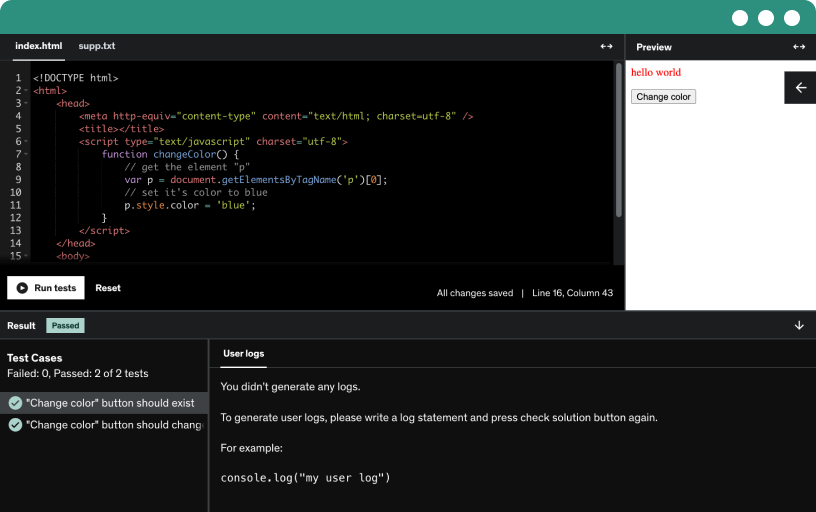
Course content
45 sections • 560 lectures • 111h 54m total length
Requirements
- Basic JavaScript familiarity: variables, simple functions, conditions and loops.
- No prior React or TypeScript experience is required; both are taught step by step.
- Use the optional JavaScript Essentials section to learn or refresh the further JavaScript needed for React.
- A computer with internet access and permission to install development tools. Setup demonstrations use Windows.
- Some activities require free accounts. The practice path uses free tools, local services and test environments.
- Be ready to write code, try the exercises and compare your work with the supplied explanations and solutions.
Description
Learn React, TypeScript, Redux and Next.js by building applications you can use, change and explain. Start with the foundations, then keep adding useful features as your skills grow—with projects, coding practice and visual explanations along the way.
Video lessons combine narrated visual explanations with step-by-step, on-screen coding demonstrations. You can pause, build alongside the lesson, and try a task before watching its solution.
Why should I enroll in this course?
Choose this course if you want to understand how an application comes together and gain practice making it work yourself. Here's what supports you along the way:
See your skills add up. Connected project milestones show how components, state, APIs and user interactions work together as an application grows.
Practice real development situations. Work with client briefs, changing requirements and bugs that need investigation—experiences you can draw on in your own projects.
Build independence through practice. Coding tasks, assignments and separate solutions give you room to try your own approach and learn from the result.
Prepare to explain your decisions. Interview assignments across Sections 2–43 help you turn what you've learned into clear technical answers.
Keep useful references close by. Detailed notes for Sections 1–43 include explanations, images and diagrams to support careful study and revision.
I'm new to React. Can I follow this course?
Absolutely. Bring basic JavaScript knowledge—variables, simple functions, conditions and loops—and we'll build from there. You don't need previous React or TypeScript experience.
Need to refresh your JavaScript? The optional JavaScript Essentials section helps you revisit the concepts you'll use. You'll also learn TypeScript before we start using it in React.
What will I actually build?
You'll work through 10 guided project milestones, building applications with features you can click, test and improve:
ShopFront: The first six milestones grow a product explorer into a shopping application with filters, a cart, checkout and member features.
Order Desk: Build an order management application with Redux Toolkit and RTK Query, keeping screens in sync as data changes.
Admin Workspace: Create a responsive admin interface with data tables, Tailwind CSS, shadcn/ui and Zustand.
Next.js storefront and full-stack extension: Build a public storefront, then extend it with a database, sign-in, permissions and order workflows. Practice payments with Stripe test transactions.
You'll work from client briefs and wireframes, make implementation decisions, and check your finished features against the requirements. Prepared styling and assets help you focus on the application logic.
I already know some React. How far does the course go?
There is plenty to build on. Beyond components, props, state and React Hooks, you'll work with React Router, APIs, form validation, authentication and different approaches to state management.
You'll explore advanced React, investigate rendering performance, and test application behavior with Vitest, React Testing Library and Playwright. Then you'll move into Next.js, connect PostgreSQL and Prisma, work with server-side permissions, and prepare applications for deployment with automated checks.
Throughout the course, we'll connect each tool to the problem it solves, so you can understand when and why to use it.
What happens when a client changes their mind—or my code breaks?
Let's work through it! A client asks for a stock-only filter. The cart needs a new quantity limit. A total stays wrong after an item is removed.
In the project lessons, you'll see how to clarify the request, find the relevant code and make the change. For bugs, we'll reproduce the problem, follow the data, investigate the cause and check the fix.
Pause before the solution and try your own idea. What would you inspect first? Change one thing, run the application and compare your reasoning with the walkthrough. These are opportunities to practice making decisions when the next step isn't obvious yet.
How much will I get to practice?
You'll have 46 coding exercises, 11 module quizzes, 28 project assignments and 2 final practice tests, plus 4 technical discussion scenarios to practice explaining your decisions.
Build a feature. Fix a bug. Try an assignment independently. Use a hint when you need one, then compare your approach with the separate solution.
Getting stuck on an attempt is part of learning. Take it one small step at a time, revisit the explanation and try again.
Will this help me prepare for interviews?
Yes—Sections 2–43 include interview assignments to help you review their key ideas and practice explaining them in your own words. The conclusion adds explained scenarios and mock interviews at beginner, intermediate and senior levels.
Try answering aloud before returning to the lesson. Explain what a feature does, why you used it and where it fits in the application. It's a useful way to discover what you understand well and what needs another look.
Will I have notes and resources to revise from?
Yes. Sections 1–43 include detailed notes with images and diagrams for revision.
Use a diagram to revisit how something works. Follow a worked example in the notes, then return to the relevant lecture when you want to see the behavior demonstrated again.
You'll also have lecture-wise source code and project checkpoints, so you can find the relevant stage of an application and continue from there.
Will we use TypeScript or JavaScript?
Lectures and projects use TypeScript. Selected browser-based React exercises use JavaScript/JSX, with matching TypeScript examples to help you connect them to the lessons.
Do I need paid tools or extra subscriptions?
The required learning activities use free tools, local services and test environments. Some activities require free accounts; paid libraries, premium templates and extra AI subscriptions aren't required. Payment practice uses test transactions.
Setup demonstrations use Windows, VS Code and the browser, with guidance to help you get started.
Bring your curiosity and keep your editor ready. Your first component, your first working feature and your next challenge are all part of the same journey.
Let's start building!
Who this course is for:
- JavaScript learners who want a structured introduction to React and TypeScript through practical applications.
- React developers who can build basic features and want a clearer understanding of state, effects, data and debugging.
- Frontend developers who want to compare Redux Toolkit, RTK Query and Zustand through focused application examples.
- Developers who want to extend React skills into Next.js, databases, authentication and full-stack workflows.
- Learners who prefer guided projects, client changes, bug-fixing practice and independent challenges.