Your cart is empty.
Keep shopping

Teach on Udemy
Turn what you know into an opportunity and reach millions around the world.
Learn MorePerl programing language From Beginner To Expert
Rating: 3.2 out of 53.2(2 ratings)
161 students
Perl programing language From Beginner To Expert
In This course You will be able to create a script and programing using perl no need for knowledge of programing
Created byIsmail Taibi
Last updated 10/2016
Arabic
What you'll learn
- You will learn perl language and you will be able to create a script
Explore related topics
Course content
9 sections • 55 lectures • 3h 35m total length
- Introdution2:18
Perl is a programming language developed by Larry Wall, especially designed for text processing. Though Perl is not officially an acronym but many times it is used as it stands for Practical Extraction and Report Language. It runs on a variety of platforms, such as Windows, Mac OS, and the various versions of UNIX.
- Installing sublime text editor2:52
To download the sulime text click in the url below : https://www.sublimetext.com/
- installing the activestate perl compiler3:01
- print3:18
- Data Type5:22
Perl is a loosely typed language and there is no need to specify a type for your data while using in your program. The Perl interpreter will choose the type based on the context of the data itself.
Perl has three basic data types − scalars, arrays of scalars, and hashes of scalars, also known as associative arrays. Here is a little detail about these data types.
S.N. Types and Description 1 Scalar − Scalars are simple variables. They are preceded by a dollar sign ($). A scalar is either a number, a string, or a reference. A reference is actually an address of a variable, which we will see in the upcoming chapters.
2 Arrays − Arrays are ordered lists of scalars that you access with a numeric index which starts with 0. They are preceded by an "at" sign (@).
3 Hashes − Hashes are unordered sets of key/value pairs that you access using the keys as subscripts. They are preceded by a percent sign (%).
- variables4:35
- Outinprinting Variables (cmd)2:08
Variables are the reserved memory locations to store values. This means that when you create a variable you reserve some space in memory.
Based on the data type of a variable, the interpreter allocates memory and decides what can be stored in the reserved memory. Therefore, by assigning different data types to variables, you can store integers, decimals, or strings in these variables.
We have learnt that Perl has the following three basic data types −
- Scalars
- Arrays
- Hashes
Accordingly, we are going to use three types of variables in Perl. A scalarvariable will precede by a dollar sign ($) and it can store either a number, a string, or a reference. An array variable will precede by sign @ and it will store ordered lists of scalars. Finaly, the Hash variable will precede by sign % and will be used to store sets of key/value pairs.
Perl maintains every variable type in a separate namespace. So you can, without fear of conflict, use the same name for a scalar variable, an array, or a hash. This means that $foo and @foo are two different variables.
- arrays8:05
An array is a variable that stores an ordered list of scalar values. Array variables are preceded by an "at" (@) sign. To refer to a single element of an array, you will use the dollar sign ($) with the variable name followed by the index of the element in square brackets.
- push array5:29
- split array4:01
- Boolean4:51
- Spacing remover Chomp3:19
- pop array3:08
- shift array1:15
- unshift array3:05
- Arguments argv3:48
- hashes4:55
A hash is a set of key/value pairs. Hash variables are preceded by a percent (%) sign. To refer to a single element of a hash, you will use the hash variable name preceded by a "$" sign and followed by the "key" associated with the value in curly brackets.
- Create your first script (calculator)2:46
- if4:03
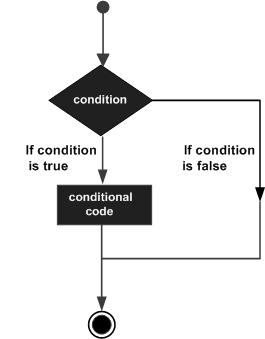
Perl conditional statements helps in the decision making, which require that the programmer specifies one or more conditions to be evaluated or tested by the program, along with a statement or statements to be executed if the condition is determined to be true, and optionally, other statements to be executed if the condition is determined to be false.
Following is the general from of a typical decision making structure found in most of the programming languages −
The number 0, the strings '0' and "" , the empty list () , and undef are all false in a boolean context and all other values are true. Negation of a true value by ! or not returns a special false value.
- else2:55
- esleif2:34
- unless2:37
- Level 1
- For4:43
There may be a situation when you need to execute a block of code several number of times. In general, statements are executed sequentially: The first statement in a function is executed first, followed by the second, and so on.
Programming languages provide various control structures that allow for more complicated execution paths.
A loop statement allows us to execute a statement or group of statements multiple times and following is the general form of a loop statement in most of the programming languages −
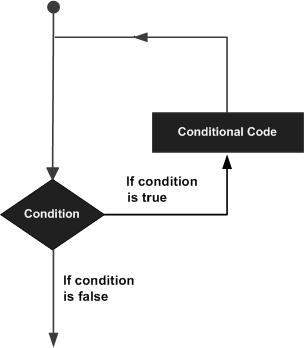
Perl programming language provides the following types of loop to handle the looping requirements.
>td >
Loop Type Description Repeats a statement or group of statements while a given condition is true. It tests the condition before executing the loop body. Repeats a statement or group of statements until a given condition becomes true. It tests the condition before executing the loop body. Executes a sequence of statements multiple times and abbreviates the code that manages the loop variable. Like a while statement, except that it tests the condition at the end of the loop body You can use one or more loop inside any another while, for or do..while loop. Loop Control Statements
Loop control statements change the execution from its normal sequence. When execution leaves a scope, all automatic objects that were created in that scope are destroyed.
C supports the following control statements. Click the following links to check their detail.
>td >
Control Statement Description Causes the loop to skip the remainder of its body and immediately retest its condition prior to reiterating. Terminates the loop statement and transfers execution to the statement immediately following the loop. A continue BLOCK, it is always executed just before the conditional is about to be evaluated again. Perl supports a goto command with three forms: goto label, goto expr, and goto &name. The Infinite Loop
A loop becomes infinite loop if a condition never becomes false. The for loop is traditionally used for this purpose. Since none of the three expressions that form the for loop are required, you can make an endless loop by leaving the conditional expression empty.
#!/usr/local/bin/perl

for( ; ; )
{
   printf "This loop will run forever.\n";
}
You can terminate the above infinite loop by pressing the Ctrl + C keys.
When the conditional expression is absent, it is assumed to be true. You may have an initialization and increment expression, but as a programmer more commonly use the for (;;) construct to signify an infinite loop.
- while2:10
- do while2:08
- foreach2:28
- until2:35
- nested1:26
- math5:46
Simple answer can be given using the expression 4 + 5 is equal to 9. Here 4 and 5 are called operands and + is called operator. Perl language supports many operator types, but following is a list of important and most frequently used operators −
- Arithmetic Operators
- Equality Operators
- Logical Operators
- Assignment Operators
- Bitwise Operators
- Logical Operators
- Quote-like Operators
- Miscellaneous Operators
Lets have a look at all the operators one by one.
Perl Arithmetic Operators
Assume variable $a holds 10 and variable $b holds 20 then −
[ Show Example ]
Operator Description Example + Addition - Adds values on either side of the operator $a + $b will give 30 - Subtraction - Subtracts right hand operand from left hand operand $a - $b will give -10 * Multiplication - Multiplies values on either side of the operator $a * $b will give 200 / Division - Divides left hand operand by right hand operand $b / $a will give 2 % Modulus - Divides left hand operand by right hand operand and returns remainder $b % $a will give 0 ** Exponent - Performs exponential (power) calculation on operators $a**$b will give 10 to the power 20 Perl Equality Operators
These are also called relational operators. Assume variable $a holds 10 and variable $b holds 20 then, lets check the following numeric equality operators −
[ Show Example ]
Operator Description Example == Checks if the value of two operands are equal or not, if yes then condition becomes true. ($a == $b) is not true. != Checks if the value of two operands are equal or not, if values are not equal then condition becomes true. ($a != $b) is true. <=> Checks if the value of two operands are equal or not, and returns -1, 0, or 1 depending on whether the left argument is numerically less than, equal to, or greater than the right argument. ($a <=> $b) returns -1. > Checks if the value of left operand is greater than the value of right operand, if yes then condition becomes true. ($a > $b) is not true. < Checks if the value of left operand is less than the value of right operand, if yes then condition becomes true. ($a < $b) is true. >= Checks if the value of left operand is greater than or equal to the value of right operand, if yes then condition becomes true. ($a >= $b) is not true. <= Checks if the value of left operand is less than or equal to the value of right operand, if yes then condition becomes true. ($a <= $b) is true. Below is a list of equity operators. Assume variable $a holds "abc" and variable $b holds "xyz" then, lets check following string equality operators:
[ Show Example ]
Operator Description Example lt Returns true if the left argument is stringwise less than the right argument. ($a lt $b) is true. gt Returns true if the left argument is stringwise greater than the right argument. ($a gt $b) is false. le Returns true if the left argument is stringwise less than or equal to the right argument. ($a le $b) is true. ge Returns true if the left argument is stringwise greater than or equal to the right argument. ($a ge $b) is false. eq Returns true if the left argument is stringwise equal to the right argument. ($a eq $b) is false. ne Returns true if the left argument is stringwise not equal to the right argument. ($a ne $b) is true. cmp Returns -1, 0, or 1 depending on whether the left argument is stringwise less than, equal to, or greater than the right argument. ($a cmp $b) is -1. Perl Assignment Operators
Assume variable $a holds 10 and variable $b holds 20, then −
[ Show Example ]
Operator Description Example = Simple assignment operator, Assigns values from right side operands to left side operand $c = $a + $b will assigned value of $a + $b into $c += Add AND assignment operator, It adds right operand to the left operand and assign the result to left operand $c += $a is equivalent to $c = $c + $a -= Subtract AND assignment operator, It subtracts right operand from the left operand and assign the result to left operand $c -= $a is equivalent to $c = $c - $a *= Multiply AND assignment operator, It multiplies right operand with the left operand and assign the result to left operand $c *= $a is equivalent to $c = $c * $a /= Divide AND assignment operator, It divides left operand with the right operand and assign the result to left operand $c /= $a is equivalent to $c = $c / $a %= Modulus AND assignment operator, It takes modulus using two operands and assign the result to left operand $c %= $a is equivalent to $c = $c % a **= Exponent AND assignment operator, Performs exponential (power) calculation on operators and assign value to the left operand $c **= $a is equivalent to $c = $c ** $a Perl Bitwise Operators
Bitwise operator works on bits and perform bit by bit operation. Assume if $a = 60; and $b = 13; Now in binary format they will be as follows −
$a = 0011 1100
$b = 0000 1101
-----------------
$a&$b = 0000 1100
$a|$b = 0011 1101
$a^$b = 0011 0001
~$a = 1100 0011
There are following Bitwise operators supported by Perl language
[ Show Example ]
Operator Description Example & Binary AND Operator copies a bit to the result if it exists in both operands. ($a & $b) will give 12 which is 0000 1100 | Binary OR Operator copies a bit if it exists in either operand. ($a | $b) will give 61 which is 0011 1101 ^ Binary XOR Operator copies the bit if it is set in one operand but not both. ($a ^ $b) will give 49 which is 0011 0001 ~ Binary Ones Complement Operator is unary and has the efect of 'flipping' bits. (~$a ) will give -61 which is 1100 0011 in 2's complement form due to a signed binary number. << Binary Left Shift Operator. The left operands value is moved left by the number of bits specified by the right operand. $a << 2 will give 240 which is 1111 0000 >> Binary Right Shift Operator. The left operands value is moved right by the number of bits specified by the right operand. $a >> 2 will give 15 which is 0000 1111 Perl Logical Operators
There are following logical operators supported by Perl language. Assume variable $a holds true and variable $b holds false then −
[ Show Example ]
Operator Description Example and Called Logical AND operator. If both the operands are true then then condition becomes true. ($a and $b) is false. && C-style Logical AND operator copies a bit to the result if it exists in both operands. ($a && $b) is false. or Called Logical OR Operator. If any of the two operands are non zero then then condition becomes true. ($a or $b) is true. || C-style Logical OR operator copies a bit if it exists in eather operand. ($a || $b) is true. not Called Logical NOT Operator. Use to reverses the logical state of its operand. If a condition is true then Logical NOT operator will make false. not($a and $b) is true. Quote-like Operators
There are following Quote-like operators supported by Perl language. In the following table, a {} represents any pair of delimiters you choose.
[ Show Example ]
Operator Description Example q{ } Encloses a string with-in single quotes q{abcd} gives 'abcd' qq{ } Encloses a string with-in double quotes qq{abcd} gives "abcd" qx{ } Encloses a string with-in invert quotes qx{abcd} gives `abcd` Miscellaneous Operators
There are following miscellaneous operators supported by Perl language. Assume variable a holds 10 and variable b holds 20 then −
[ Show Example ]
Operator Description Example . Binary operator dot (.) concatenates two strings. If $a="abc", $b="def" then $a.$b will give "abcdef" x >td >('-' x 3) will give ---. .. >td >(2..5) will give (2, 3, 4, 5) ++ Auto Increment operator increases integer value by one $a++ will give 11 -- Auto Decrement operator decreases integer value by one $a-- will give 9 -> >td >$obj->$a is an example to access variable $a from object $obj. Perl Operators Precedence
The following table lists all operators from highest precedence to lowest.
[ Show Example ]
left	terms and list operators (leftward)
left	->
nonassoc	++ --
right	**
right	! ~ \ and unary + and -
left	=~ !~
left	* / % x
left	+ - .
left	<< >>
nonassoc	named unary operators
nonassoc	< > <= >= lt gt le ge
nonassoc	== != <=> eq ne cmp ~~
left	&
left	| ^
left	&&
left	|| //
nonassoc	..  ...
right	?:
right	= += -= *= etc.
left	, =>
nonassoc	list operators (rightward)
right	not
left	and
left	or xor
- Equality5:46
- Assignment8:12
- Logical5:32
- Quote-like Operators1:58
- bit and byte5:40
- betwse AND3:33
- betwise Or1:35
- betwise XOr2:13
- Betwise not1:41
- betwise shift left1:34
- Betwise shift right1:31
- Current Date & Time7:06
This chapter will give you the basic understanding on how to process and manipulate dates and times in Perl.
Current Date & Time
Let's start with localtime() function, which returns values for the current date and time if given no arguments. Following is the 9-element list returned by the localtime function while using in list context −
sec,     # seconds of minutes from 0 to 61
min,     # minutes of hour from 0 to 59
hour,    # hours of day from 0 to 24
mday,    # day of month from 1 to 31
mon,     # month of year from 0 to 11
year,    # year since 1900
wday,    # days since sunday
yday,    # days since January 1st
isdst    # hours of daylight savings time
Try the following example to print different elements returned by localtime() function −
#!/usr/local/bin/perl

@months = qw( Jan Feb Mar Apr May Jun Jul Aug Sep Oct Nov Dec );
@days = qw(Sun Mon Tue Wed Thu Fri Sat Sun);

($sec,$min,$hour,$mday,$mon,$year,$wday,$yday,$isdst) = localtime();
print "$mday $months[$mon] $days[$wday]\n";
When the above code is executed, it produces the following result −
16 Feb Sat
If you will use localtime() function in scalar context, then it will return date and time from the current time zone set in the system. Try the following example to print current date and time in full format −
#!/usr/local/bin/perl

$datestring = localtime();
print "Local date and time $datestring\n";
When the above code is executed, it produces the following result −
Local date and time Sat Feb 16 06:50:45 2013
GMT Time
The function gmtime() works just like localtime() function but the returned values are localized for the standard Greenwich time zone. When called in list context, $isdst, the last value returned by gmtime, is always 0 . There is no Daylight Saving Time in GMT.
You should make a note on the fact that localtime() will return the current local time on the machine that runs the script and gmtime() will return the universal Greenwich Mean Time, or GMT (or UTC).
Try the following example to print the current date and time but on GMT scale −
#!/usr/local/bin/perl

$datestring = gmtime();
print "GMT date and time $datestring\n";
When the above code is executed, it produces the following result −
GMT date and time Sat Feb 16 13:50:45 2013
Format Date & Time:
You can use localtime() function to get a list of 9-elements and later you can use the printf() function to format date and time based on your requirements as follows −
#!/usr/local/bin/perl

($sec,$min,$hour,$mday,$mon,$year,$wday,$yday,$isdst) = localtime();

printf("Time Format - HH:MM:SS\n");
printf("%02d:%02d:%02d", $hour, $min, $sec);
When the above code is executed, it produces the following result −
Time Format - HH:MM:SS
06:58:52
Epoch time
You can use the time() function to get epoch time, i.e. the numbers of seconds that have elapsed since a given date, in Unix is January 1, 1970.
#!/usr/local/bin/perl

$epoc = time();

print "Number of seconds since Jan 1, 1970 - $epoc\n";
When the above code is executed, it produces the following result −
Number of seconds since Jan 1, 1970 - 1361022130
You can convert a given number of seconds into date and time string as follows −
#!/usr/local/bin/perl

$datestring = localtime();
print "Current date and time $datestring\n";

$epoc = time();
$epoc = $epoc - 12 * 60 * 60;   # one day before of current date.

$datestring = localtime($epoc);
print "Yesterday's date and time $datestring\n";
When the above code is executed, it produces the following result −
Current date and time Sat Feb 16 07:05:39 2013
Yesterday's date and time Fri Feb 15 19:05:39 2013
POSIX Function strftime()
You can use the POSIX function strftime() to format date and time with the help of the following table. Please note that the specifiers marked with an asterisk (*) are locale-dependent.
Specifier Replaced by Example %aAbbreviated weekday name * Thu%AFull weekday name * Thursday%bAbbreviated month name * Aug%BFull month name * August%cDate and time representation * Thu Aug 23 14:55:02 2001%CYear divided by 100 and truncated to integer ( 00-99)20%dDay of the month, zero-padded ( 01-31)23%DShort MM/DD/YYdate, equivalent to%m/%d/%y08/23/01%eDay of the month, space-padded ( 1-31)23%FShort YYYY-MM-DDdate, equivalent to%Y-%m-%d2001-08-23%gWeek-based year, last two digits ( 00-99)01%gWeek-based year 2001%hAbbreviated month name * (same as %b)Aug%HHour in 24h format ( 00-23)14%IHour in 12h format ( 01-12)02%jDay of the year ( 001-366)235%mMonth as a decimal number ( 01-12)08%MMinute ( 00-59)55%nNew-line character ( '\n')%pAM or PM designation PM%r12-hour clock time * 02:55:02 pm%R24-hour HH:MMtime, equivalent to%H:%M14:55%SSecond ( 00-61)02%tHorizontal-tab character ( '\t')%TISO 8601 time format ( HH:MM:SS), equivalent to%H:%M:%S14:55%uISO 8601 weekday as number with Monday as 1(1-7)4%UWeek number with the first Sunday as the first day of week one ( 00-53)33%VISO 8601 week number ( 00-53)34%wWeekday as a decimal number with Sunday as 0(0-6)4%WWeek number with the first Monday as the first day of week one ( 00-53)34%xDate representation * 08/23/01%XTime representation * 14:55:02%yYear, last two digits ( 00-99)01%YYear 2001%zISO 8601 offset from UTC in timezone (1 minute=1, 1 hour=100) If timezone cannot be termined, no characters
+100%ZTimezone name or abbreviation * If timezone cannot be termined, no characters
CDT%%A %sign%Let's check the following example to understand the usage −
#!/usr/local/bin/perl
use POSIX qw(strftime);

$datestring = strftime "%a %b %e %H:%M:%S %Y", localtime;
printf("date and time - $datestring\n");

# or for GMT formatted appropriately for your locale:
$datestring = strftime "%a %b %e %H:%M:%S %Y", gmtime;
printf("date and time - $datestring\n");
When the above code is executed, it produces the following result −
date and time - Sat Feb 16 07:10:23 2013
date and time - Sat Feb 16 14:10:23 2013
- GMT Time2:00
- Format Date & Time3:19
- Epoch time1:36
- POSIX Function strftime()4:01
- Define and Call a Subroutine2:01
A Perl subroutine or function is a group of statements that together performs a task. You can divide up your code into separate subroutines. How you divide up your code among different subroutines is up to you, but logically the division usually is so each function performs a specific task.
Perl uses the terms subroutine, method and function interchangeably.
Define and Call a Subroutine
The general form of a subroutine definition in Perl programming language is as follows −
sub subroutine_name{
   body of the subroutine
}
The typical way of calling that Perl subroutine is as follows −
subroutine_name( list of arguments );
In versions of Perl before 5.0, the syntax for calling subroutines was slightly different as shown below. This still works in the newest versions of Perl, but it is not recommended since it bypasses the subroutine prototypes.
&subroutine_name( list of arguments );
Let's have a look into the following example, which defines a simple function and then call it. Because Perl compiles your program before executing it, it doesn't matter where you declare your subroutine.
#!/usr/bin/perl

# Function definition
sub Hello{
   print "Hello, World!\n";
}

# Function call
Hello();
When above program is executed, it produces the following result −
Hello, World!
Passing Arguments to a Subroutine
You can pass various arguments to a subroutine like you do in any other programming language and they can be acessed inside the function using the special array @_. Thus the first argument to the function is in $_[0], the second is in $_[1], and so on.
You can pass arrays and hashes as arguments like any scalar but passing more than one array or hash normally causes them to lose their separate identities. So we will use references ( explained in the next chapter ) to pass any array or hash.
Let's try the following example, which takes a list of numbers and then prints their average −
#!/usr/bin/perl

# Function definition
sub Average{
   # get total number of arguments passed.
   $n = scalar(@_);
   $sum = 0;

   foreach $item (@_){
      $sum += $item;
   }
   $average = $sum / $n;

   print "Average for the given numbers : $average\n";
}

# Function call
Average(10, 20, 30);
When above program is executed, it produces the following result −
Average for the given numbers : 20
Passing Lists to Subroutines
Because the @_ variable is an array, it can be used to supply lists to a subroutine. However, because of the way in which Perl accepts and parses lists and arrays, it can be difficult to extract the individual elements from @_. If you have to pass a list along with other scalar arguments, then make list as the last argument as shown below −
#!/usr/bin/perl

# Function definition
sub PrintList{
   my @list = @_;
   print "Given list is @list\n";
}
$a = 10;
@b = (1, 2, 3, 4);

# Function call with list parameter
PrintList($a, @b);
When above program is executed, it produces the following result −
Given list is 10 1 2 3 4
Passing Hashes to Subroutines
When you supply a hash to a subroutine or operator that accepts a list, then hash is automatically translated into a list of key/value pairs. For example −
#!/usr/bin/perl

# Function definition
sub PrintHash{
   my (%hash) = @_;

   foreach my $key ( keys %hash ){
      my $value = $hash{$key};
      print "$key : $value\n";
   }
}
%hash = ('name' => 'Tom', 'age' => 19);

# Function call with hash parameter
PrintHash(%hash);
When above program is executed, it produces the following result −
name : Tom
age : 19
Returning Value from a Subroutine
You can return a value from subroutine like you do in any other programming language. If you are not returning a value from a subroutine then whatever calculation is last performed in a subroutine is automatically also the return value.
You can return arrays and hashes from the subroutine like any scalar but returning more than one array or hash normally causes them to lose their separate identities. So we will use references ( explained in the next chapter ) to return any array or hash from a function.
Let's try the following example, which takes a list of numbers and then returns their average −
#!/usr/bin/perl

# Function definition
sub Average{
   # get total number of arguments passed.
   $n = scalar(@_);
   $sum = 0;

   foreach $item (@_){
      $sum += $item;
   }
   $average = $sum / $n;

   return $average;
}

# Function call
$num = Average(10, 20, 30);
print "Average for the given numbers : $num\n";
When above program is executed, it produces the following result −
Average for the given numbers : 20
Private Variables in a Subroutine
By default, all variables in Perl are global variables, which means they can be accessed from anywhere in the program. But you can create private variables called lexical variables at any time with the my operator.
The my operator confines a variable to a particular region of code in which it can be used and accessed. Outside that region, this variable cannot be used or accessed. This region is called its scope. A lexical scope is usually a block of code with a set of braces around it, such as those defining the body of the subroutine or those marking the code blocks of if, while, for, foreach, and evalstatements.
Following is an example showing you how to define a single or multiple private variables using my operator −
sub somefunc {
   my $variable; # $variable is invisible outside somefunc()
   my ($another, @an_array, %a_hash); # declaring many variables at once
}
Let's check the following example to distinguish between global and private variables −
#!/usr/bin/perl

# Global variable
$string = "Hello, World!";

# Function definition
sub PrintHello{
   # Private variable for PrintHello function
   my $string;
   $string = "Hello, Perl!";
   print "Inside the function $string\n";
}
# Function call
PrintHello();
print "Outside the function $string\n";
When above program is executed, it produces the following result −
Inside the function Hello, Perl!
Outside the function Hello, World!
Temporary Values via local()
The local is mostly used when the current value of a variable must be visible to called subroutines. A local just gives temporary values to global (meaning package) variables. This is known as dynamic scoping. Lexical scoping is done with my, which works more like C's auto declarations.
If more than one variable or expression is given to local, they must be placed in parentheses. This operator works by saving the current values of those variables in its argument list on a hidden stack and restoring them upon exiting the block, subroutine, or eval.
Let's check the following example to distinguish between global and local variables −
#!/usr/bin/perl

# Global variable
$string = "Hello, World!";

sub PrintHello{
   # Private variable for PrintHello function
   local $string;
   $string = "Hello, Perl!";
   PrintMe();
   print "Inside the function PrintHello $string\n";
}
sub PrintMe{
   print "Inside the function PrintMe $string\n";
}

# Function call
PrintHello();
print "Outside the function $string\n";
When above program is executed, it produces the following result −
Inside the function PrintMe Hello, Perl!
Inside the function PrintHello Hello, Perl!
Outside the function Hello, World!
State Variables via state()
There are another type of lexical variables, which are similar to private variables but they maintain their state and they do not get reinitialized upon multiple calls of the subroutines. These variables are defined using the stateoperator and available starting from Perl 5.9.4.
Let's check the following example to demonstrate the use of state variables −
#!/usr/bin/perl

use feature 'state';

sub PrintCount{
   state $count = 0; # initial value

   print "Value of counter is $count\n";
   $count++;
}

for (1..5){
   PrintCount();
}
When above program is executed, it produces the following result −
Value of counter is 0
Value of counter is 1
Value of counter is 2
Value of counter is 3
Value of counter is 4
Prior to Perl 5.10, you would have to write it like this −
#!/usr/bin/perl

{
   my $count = 0; # initial value

   sub PrintCount {
      print "Value of counter is $count\n";
      $count++;
   }
}

for (1..5){
   PrintCount();
}
Subroutine Call Context
The context of a subroutine or statement is defined as the type of return value that is expected. This allows you to use a single function that returns different values based on what the user is expecting to receive. For example, the following localtime() returns a string when it is called in scalar context, but it returns a list when it is called in list context.
my $datestring = localtime( time );
In this example, the value of $timestr is now a string made up of the current date and time, for example, Thu Nov 30 15:21:33 2000. Conversely −
($sec,$min,$hour,$mday,$mon, $year,$wday,$yday,$isdst) = localtime(time);
Now the individual variables contain the corresponding values returned by localtime() subroutine.
- Passing Arguments to a Subroutine3:47
- Strict2:02
- Cpan5:50
- Introduction mechanize2:12
- install Mechanize3:13
- mechanize connection with url8:30
- Create an autoliker script facebook - part 110:00
- Create an autoliker script facebook - part 211:21
- Create an autoliker script facebook - part 37:34
Requirements
- active state compiler and sublime text
Description
As a Beginner you have to start programing using perl because this language help you to create scripts like bots,autoliker,autologin ... etc . also in ethical hacking tools its help to make a very powereful tools . it's the easiest language to learn and the powerful one . as a student or beginner this language is the best one to start.
Who this course is for:
- begginers