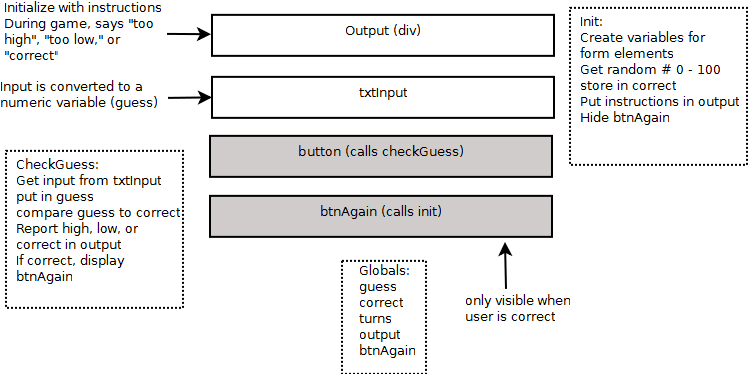
The video features the game you can find here. Open the game in your browser and use ctrl-u (or the 'view source' command) to view the code.
Pages mentioned in this lecture:
Change how your web page looks by adding CSS.
Files used in this example:
Note that we're deliberately discussing a very small subset of CSS. If you want to learn more about CSS, please see my book HTML / CSS All in One for Dummies.
Think about the design of your adventure game and how you will implement it in HTML and CSS.
Create your nodes, make your images into links, and add sound effects for even more fun.
Files demonstrated in this video:
Files used in this video:
Learn to build the form for the word story game. While you already know all the HTML code you need for this game, the code won't look good on its own. Add a floating CSS layout to make the page look great.
Code used in this lecture:
Form.css (Use this in your own forms to add a floating layout.)
Put together all you've learned to build the word story. Tie together HTML, CSS, and JavaScript code. Files used in this video:
Learn how JavaScript works with data, and a surprising error you can get when you trust the computer too much. Prevent this type of error by converting data to the format you need.
Programs used in this video:
Computers seem to make decisions when programmers use a concept called a condition. Learn how to build your own conditions in several variations of the if statement.
Examples used in this video:
Note if you're using the "HTML5 Game Programming for Dummies" book, these examples were actually taken from another book with a bit more detail (HTML5 / CSS3 All in One for Dummies) I didn't have as many examples on the HTML5 Gaming page, so I borrowed from another book for clarity.
Often you'll need the computer to do something a certain number of times (Each alien in your game might need to drop a bomb, for example.) Programming languages have a structure called a "for loop" for exactly this situation. Look at a number of for loops to see how the computer can count efficiently.
File viewed in this video:
The while loop is a more flexible alternative to the for loop. Learn how to build a well-behaved while loop. You'll also learn how to build a loop that can exit in multiple ways, and how to watch your code run line-by-line to detect logic errors.
Files used in this video:
You've been using simple functions, but now you learn how to make them work well with the rest of the program. Add parameters to input values into functions, and use return values to have functions produce a value.
Files used in this video:
If functions are used to put together multiple instruction, you might wonder if there's a way to group data as well. Of course, there is such a concept, and in programming this is the array. Learn to build arrays in a couple of ways. Learn how for loops are the natural companion to for loops, and how to access and modify data in an array.
Files used in this video:
With all the basic programming concepts covered, you're ready to build a basic text-based game. Take a look at the game, then learn about how to plan a game to make the programming as easy as possible.
Files used in this video:
Games often include random behavior. Computer programs use random number generation for practically all random numbers. Learn how to build a random number within any range of values.
Files used in this video:
Take all the concepts you've learned up to now and build a complete text-based game! This game features HTML, CSS, JavaScript, conditions, functions... pretty much everything we've done so far.
Files described in this video:
HTML5 doesn't directly support game programming, but there are a number of libraries which add support for the main aspects of gaming. Learn about the simpleGame library, designed specifically to be easy to learn and use while building great games. Look at a simple animation which demonstrates the basic use of this engine.
Files used in this video:
Please be sure to run this (and all files in this course) directly, as the performance in the videos tends to be more jerky than in real life.
Overview of the simpleGame engine. Learn how to find the latest version of the engine, how to download it for use in your own games, and see the main features of the engine.
Files used in this video:
book main page Main page for this course's companion book
simpleGame.js Version of the simpleGame library used in this course
simpleGame Documentation Official documentation of the simpleGame library
template Save a copy of this code for a convenient starting place for your games
The most obvious difference between a game and an animation is user interactivity.
Learn how to check for keyboard input, how the keyboard array works, and how to set up an image for use in game animation.
Files used in this video:
car.png car image used in game. Note images should face to right and have a transparent background.
Learn how to use a special online tool to build experimental games even if you don't have anything installed on your computer. Play around with the simpleGame engine any time you can get to a web browser.
Files used in this video:
Object-Oriented-Programming is one of the most exciting ideas in computer programming, and it's a major part of game development. Learn the basic elements of OOP by customizing a Sprite to make a new object. Learn about inheritance, properties, and methods.
Files used in this video:
critter.html - A very basic sprite
critterConstructer.html - Turning a critter into an object
critterSpeed.html - Adding a property to an object
critterChangeSpeed.html - Adding a method to an object
Sound effects are an important aspect of game development. Learn how to build and play sound effects with the simpleGame Sound object.
Files used in this video:
audacity - audio editor mentioned in this video
All the best things in gaming happen when sprites collide with each other. Learn two ways to detect sprite collisions, and understand the strengths and limitations of each.
Files referenced in this video:
colTest.html - Investigate bounding-rectangle collisions
boundRect.png - Understand the biggest weakness of the bounding box paradigm
distance.html - Explore distance-based collision detection
Game ideas don't go anywhere unless they begin with a solid plan. Learn how to build a game design document detailed enough that you'll actually be able to program with it.
Files used in this video:
All the interesting things in arcade gaming happen when sprites collide with each other. Add collision detection and a simple sound effect to the frog game.
Files used in this example:
Once you know how to work with a single fly, learn how to use arrays to manage multiple flies. Learn how to build multiple flies in an array, then how to use loops to create and update the flies. For once, you're introducing bugs into a program on purpose!
Finish your game by adding a simple scorekeeping and timing mechanism to it. Learn a sneaky but simple way to reset your game.
Getting your sprites to move realistically requires a very basic knowledge of physics. Learn how Newton's laws of motion apply to game programming, and experiment by building an asteroids-like spacecraft.
Files used in this video:
Understanding acceleration and drag are the secret to realistic vehicle motion. Learn a simple mechanism for adding these features to your sprites.
Files used in this video:
Drifting and skidding behavior can be quite difficult to program, but here you will learn a simple mechanism for creating fun skidding and drifting behavior for your sprites.
Files used in this video:
Many games utilize some sort of gravitational pull. It turns out gravity is quite easy to implement when you understand force vectors. Learn to implement the type of gravity used in side scrollers and flying games.
Files used in this video:
Orbital physics is rocket science, but it's really not that hard. Learn how a basic formula can build realistic orbits for a very fun game dynamic.
Files used in this video:
What good is a vehicle without a rocket launcher? Learn the basics of firing a missile or other projectile from a sprite. Also learn how to create a stream of bullets with a random spread and multiple bullets shotgun-style.
Files used in this video
Another aspect of animation is the use of a sprite sheet to combine multiple images to create animated characters. Learn how to build an animated character from a sprite sheet.
Files used in this video:
HTML5 is great for mobile development. Look at a variation of the frog game designed for mobile use, and learn how to create games that work well on mobile devices, even when the device is not on the Internet. Learn also how to add an icon to a mobile web game.
Files used in this video:
mobile Frog Game (note this game is optimized for mobile devices - it may not work on a desktop machine.) Use save link to desktop on IOS to keep a local copy of the game.
cache.manifest The cache manifest file used when building this game.
To see your games on a mobile device, you'll need to post it to some kind of hosting service. Learn the basics of setting up such a service. Also, learn how to set the size and position of the scene to best fit your device screen.
Files used in this video:
Mobile devices do not support a mouse, and the touch interface isn't exactly like a mouse. Learn how you can treat the touch interface like a mouse, and how to add a simple button to your game.
Files used in this video:
Touch interfaces are often used as virtual joysticks. The simpleGame library has a virtual joystick object. Learn how to use it in a couple of ways. Learn how to build a convertible game that works with either a keyboard or a touch interface, and learn a clever technique for making the virtual joystick act just like the arrow keys.
Files used in this video:
Many mobile devices come with a built-in accellerometer which can be used to detect the orientation of the device. Learn how to harness this feature in your games.
Files featured in this video:
Get an overview of the simpleGame library and the scene element.
File used in this video:
The sprite object is one of the key elements of simpleGame. Learn all of the methods and properties of this important object.
File used in this video:
SimpleGame includes a number of utility objects. Learn the various aspects of the sound system, the keyboard mechanism, and the timer object.
File used in this video:
SimpleGame includes a number of useful elements for mobile game development. Learn how to use the touch interface, virtual joystick, and tilt interface.
File used in this video:
Learn to build web and mobile games with HTML5. Even if you have no experience in programming or web development, you can create your own games.
This course begins with a quick overview of web development in HTML5 and shows you the basic web framework used in all modern pages. It then teaches essential programming concepts using the JavaScript language embedded in all modern browsers.
The course centers around a game engine designed especially to be easy to understand. The game engine and all the other tools needed for the course are completely free. You won't need to purchase anything to build great games.
By the end of the course, you'll be able to build 2D games on the web as well as on mobile devices like the iPad and mobile phones.