This video gives you an introduction to EasyDSLR Digital Photography Course and it's creator Ken Schultz. Includes a discussion of the benefits of DSLR cameras and a tip for photographing quick events with unpredictable timing.
This Video gives you an Orientation and Overview of the EasyDSLR Course for Beginners. It includes an important introduction to the Photo Triangle which is used as a Foundation to discussing the important concepts and settings of your DSLR camera.
The Photo Triangle illustrates the 3 Main concepts in getting a great Photo. Camera settings and other values are overlaid showing their influence on different components of an image.
I introduce the Photo Triangle in the Previous Video and the settings will be dealt with in the appropriate Videos in the course.
(See Page 2 for the Key)
In this video I talk about DSLR (Digital Single Lens Reflex) cameras compared to “old school” film SLR and Point and shoot cameras.
This Video covers:
I don’t go through every feature and control as I will address those in the relevant sections in the DSLR Basics module.
In addition to the features mentioned in the video, DSLR cameras have connectors for:
Refer to your DSLR manual for all the buttons, controls and connectors for your particular camera.
In this video I talk about some essential items for your DSLR kit.
The next 'lecture' has the DSLR essentials Checklist.
The Gold Videos and "Let's get Creative" sections refers to the Advancd Course - EasyDSLR Digital Photography Course: Advanced
A list of Essential items in your DSLR kit as well as useful extras.
UPDATED: 2012 Digital SLR Buyer's Guide. What Camera to Buy and Must Have Accessories.
Use this link if you are having trouble loading in Udemy interface - New DSLR buyer's Guide 2012
Please Note: The links to products are not 'Live' in the Udemy Interface - you need to download from the link above to get the Live Links.
Compares Canon and Nikon DSLR Models and other useful accessories for your kit. Now includes Canon T4i (650D), Canon 6D, Canon 5D Mark III, Canon EOS-1D X, Nikon D3200, Nikon D600, Nikon D800/800E, Nikon D4.
In this video I talk about Composition, Lens Choice and Perspective in framing your subject.
This video goes through the first point on the Photo Triangle - FRAME and includes explanations of:
In this video I introduce Exposure – which is part of the LIGHT corner of the Photo Triangle
I will describe Exposure, including:
You may need to look in your Camera Manual to find the particular modes and settings I mention as they may have different names and positions for different manufacturers.
Please Note: Some DSLR Cameras (for example the Nikon D5100) don’t have a Histogram in Live View Mode. You can still see the Histogram after taking a photo in Playback mode. Please check your camera manual to see if it has the feature.
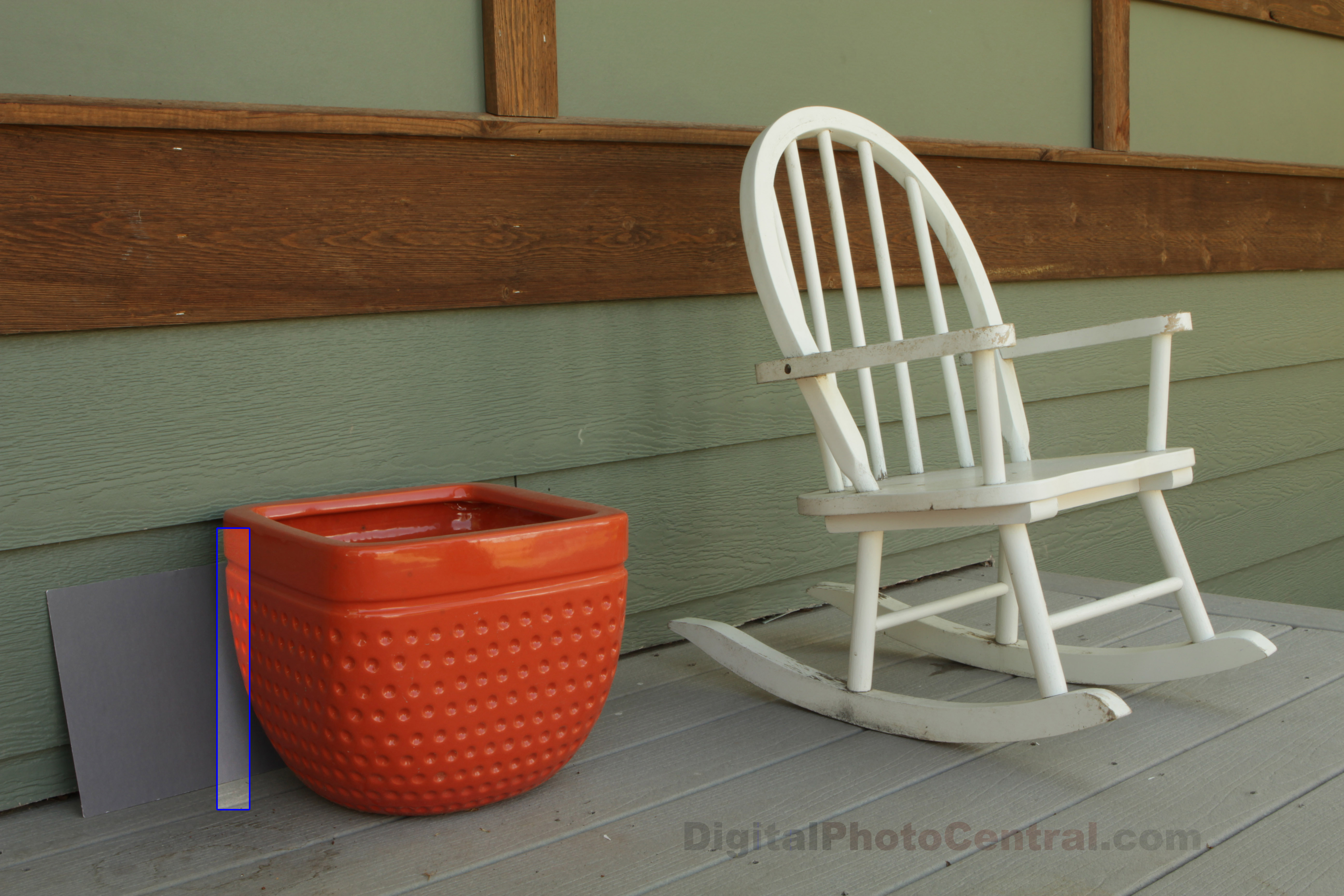
I mentioned a Test Scene in the video that shows the noise levels at different ISO settings. I used a rectangle from the scene below (click on image for larger size) to examine noise. When you click on the image it will open in a different Tab or Window and you may have to click on the image in this new window to see the Full Size image.
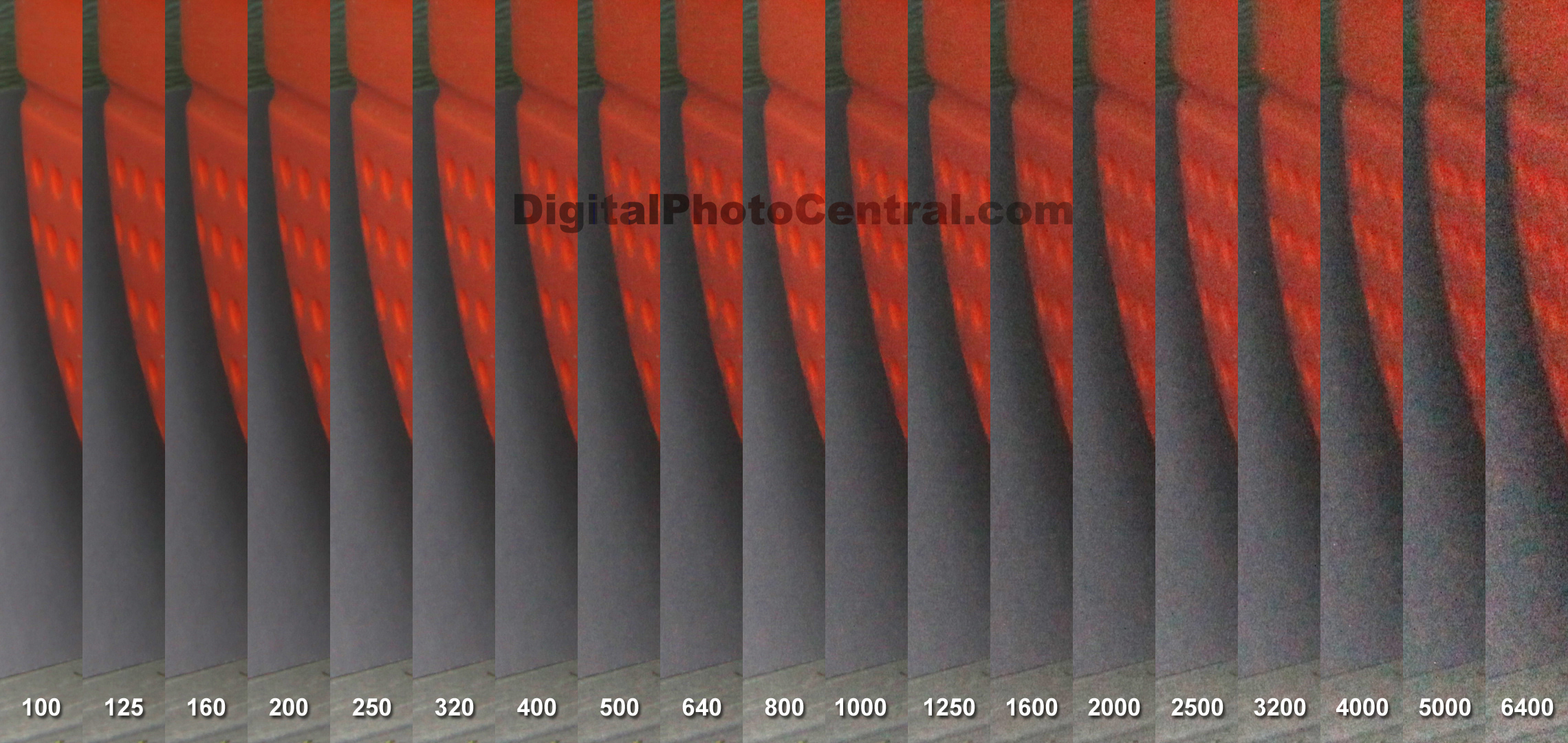
The image below (click on image for larger size) shows the noise levels at different ISO settings.
Tip: With Cameras with AUTO ISO option you can usually set the upper limit in the Menus – check you manual – That way, if you are worried about noise – you could limit ISO to 800 or 1600 and still have the convenience of AUTO.
In this second video in our Exposure section I describe Aperture – which is one of the key settings that affect Exposure (in the LIGHT corner of the Photo Triangle)
You will learn:
Once again – you may need to look in your Camera Manual to find the particular modes and settings I mention.
Aperture values are a ratio and the smaller the number the larger the Diameter opening as shown in the example below.

In the above example going from f/8 upwards (right to left) – each value doubles the amount of light on the sensor – these are going up by 1 Stop or 1 EV ( Exposure Value). Most DSLR cameras have smaller settings in between each stop letting you change values by 1/2 or 1/3 stops (EV). In your viewfinder whole numbers on the Exposure scale are at 1 Stop (EV) increments.
This is an introductory course so I have not gone into too much depth. I want you to get the basics quickly so you can get out there and take better photos.
For those who want more detailed information Click here (it has a lot of technical details on Aperture).
Shutter Speed demystified and its effect on Exposure.
This is the third video in our Exposure section. We will look at Shutter Speed – another key setting that affects Exposure (in the LIGHT corner of The Photo Triangle).
You will learn:
With an Introduction to:
Once again – you may need to look in your Camera Manual to find the particular modes and settings I mention.
In the video I talk about the general rule that to get a steady shot with a certain focal length lens – like a 100mm it’s best to use 1/100 sec Shutter Speed or faster. You also need to consider if you have a full frame sensor or cropped sensor camera. If you have a cropped sensor DSLR like a Canon 60D your 100mm lens has the same magnification as a 160mm on a full frame DSLR so it’s best to use 1/160 sec or faster for steady shots – unless you have image stabilization (vibration reduction).
Just to Clarify: It’s best to think of Shutter Speed as FAST (small slice of Time) or SLOW (long slice of time). Confusion comes from the fact that Shutter Speed is given in Seconds (or fractions of a second) NOT actually a Speed value but a Time value (I guess that is why Canon use Tv mode – Time Value). So the smaller the number or duration of Time the FASTER the Shutter Speed. Basically, they don’t mention the Distance covered over Time (required for Speed value) because it’s always the same (the height of your sensor).
To add to confusion – the Shutter Speed in the viewfinder is usually in whole numbers (with or without a ” symbol). In the viewfinder 500 will actually mean 1/500 sec, 0″4 means 0.4 sec and 30″ means 30 sec. In some way this helps because a Larger Number without the ” symbol means a Faster Shutter Speed. At Slow Shutter Speeds, when the ” symbol comes into it the Larger the Number the LONGER the exposure.
Learning Shutter Speed will be a spring board to really Creative photos. Understanding how it works and what effect it has on your photos is fundamental to understanding photography
Explanation of White Balance and DSLR White Balance settings.
In this video we will look at White Balance – the key setting that affects Color (in the LIGHT corner of The Photo Triangle).
You will learn:
Once again – you may need to look in your Camera Manual to find the particular modes and settings I mention.
Beyond the Basics. White Balance Bracketing and Setting Custom White balance for accurate color.
In this video I go into more advanced White Balance settings.
You will learn:
The Custom White Balance accessories I used in this Video are:
Make sure that you get an Expo Disc that fits your largest Diameter Lens – that way you can hold it over the front of your smaller lenses too.
Auto Focus Modes and Manual Focusing.
In this video I go into the Basics of Focusing.
You will learn:
In this video I show you how to Choose Focus Modes on a Canon 60D – Please look in your Camera manual to find out where the settings are and what Modes you have on your Camera.
Depth of Field explained and how to control it.
Depth of Field (DOF) is a key concept to understand and master to become more creative with your Photos.
One of the real benefits of a DSLR over Point and Shoot cameras is ability to create really Narrow DOF to Isolate your subject. The Larger sensors and Larger Apertures (discussed in the Video above) of DSLR cameras result in much Narrower DOF compared to Point and Shoot cameras. This fine control over DOF is what gives DSLR cameras the Creative edge.
In this video you will learn:
Full Frame DSLR Cameras: Larger Sensor Size allows Narrower Depth of Field so a Full Frame Sensor camera like Canon 5D Mark II will have Narrower DOF than a Crop Sensor DSLR like Canon 60D or Nikon D3100. That’s the reason why you can get a more Isolated subject on Professional Level DSLR cameras.
View the Image file in Extra Resources to see the Effect of 3 Different Apertures on the Depth of Field in the scene in the video.
Flash Photography is a huge topic with entire books and courses dedicated to the subject. So this video is an introduction to Flash Photography giving you the most common scenarios where you would use flash. I show you some examples with tips to using flash in each of these situations.
In this video I go into the Basics of Flash Photography.
You will learn:
Check Your Camera Manual: I touched on a few Flash settings:Like ETTL (Evaluative Through The Lens metering) where the Flash uses your DSLR metering system to calculate the Flash output, Flash Exposure Compensation and choice of First or Second Curtain Firing. There are a bunch of other settings that were beyond these introductory Videos like the use of Flash Exposure Lock (FE Lock) and Flash Exposure Bracketing. Check your manual for the flash settings on your camera.
For those of you who want to jump into some more serious Flash Photography using External Dedicated Flash units I would recommend the following equipment.
Canon
Nikon
Transmitter/Receiver
These are required if your DSLR does not have built in Wireless Flash Triggering System
The second Pocket Wizard High-end system has Transceivers - which can act as both Transmitters or Receivers
Recommended Flash Courses:
If you want to go further with your Flash Photography, especially Off-Camera Flash, then I highly recommend Phil Steele’s Online Video Course.
Getting more pleasing Flash Photos with the use of Diffusers.
Flash Diffusers create Softer Light by making a larger surface and scattering the light from the flash unit. I prefer the softer light of Flash used with Diffusers. When I was a professional Wedding Photographer I used Diffusers most of the time to create more flattering light on brides – using external Flash.
In this video I go into the Basics of Flash Diffusers.
You will learn:
Once again for more Creative Flash Photography, aside from a Diffuser, a Dedicated External Flash (Speedlite or Speed light) is recommended.
Diffusers
Canon
Nikon
Transmitter/Receiver
These are required if your DSLR does not have built in Wireless Flash Triggering System
The second Pocket Wizard High-end system has Transceivers - which can act as both Transmitters or Receivers
Recommended Flash Courses:
If you want to go further with your Flash Photography, especially Off-Camera Flash, then I highly recommend Phil Steele’s Online Video Course.
This concludes the Videos for this Course – I hope that gives you a good overall grounding in the Photographic Principles so you can experiment with your DSLR and start to get better photos.
The reference to Gold Member Videos is for the more advanced Creative Videos which will soon be available as a follow up course on udemy.
Thank you for joining me :)
Best Wishes with your Photography

This short video discusses what you should get out of this Course.
If you are Ready to continue your Journey to more Creative Photos dive into EasyDSLR Digital Photography Course: Advanced
Most new DSLR camera owners use very little of the potential of their cameras. (DSLR = Digital Single Lens Reflex). The thought of moving off AUTO can be daunting. To really get creative control over your photos you need to grasp some basic photography principles - it's not 'rocket science' - but it is essential. This course is to fill that gap in knowledge so you can get into the more creative modes of your camera and start taking better photos. Over 4 Hours Training.
If this Course seems a little too Basic for you check out my Advanced Course for more Creative topics - EasyDSLR Digital Photography Course: Advanced
Recent Member Comment "I'm blown away with how much knowledge I'm retaining when I walk away from each video. It's exactly my learning style as I'm very much a visual person." Andy Rose UK
CHAPTER 1: Getting Started gives you an orientation of the course and introduces The Photo Triangle - which is the foundation that most of the concepts in this course rest on.
If you are totally new to DSLR cameras you can watch CHAPTER 2: DSLR Overview where I give you a quick tour of What a DSLR camera is, it's benefits and essential items in your DSLR kit.
The major portion of this course talks about the 3 Main points to a great photo - The Photo Triangle:
You can Download the Printable PDF version of the Photo Triangle in Chapter 1 to have on hand during the course.
Having a solid foundation is key to understanding how the settings interact to create a great photo. In this course I cover Composition, the 3 important settings affecting Exposure: ISO, Aperture, and Shutter Speed, White Balance, Focus and Depth of Field, Flash basics and Diffusers.
These are some of what you will Discover:
I am confident that you will be much more comfortable using your DSLR camera and will be taking better photos by the end of this course.