
Your cart is empty.
Keep shopping
Claude Code - Complete AI-Assisted Software Development
Role Play
Hot & New
57 students
Claude Code - Complete AI-Assisted Software Development
Prompt Engineering, Context Engineering, MCP & Spec-Driven Development - Build, Test and Review with AI Agents
Created byWeb Academy by Harsha Vardhan
Last updated 11/2026
English
English
What you'll learn
- Use Claude Code to explore a repository, plan a focused change, edit code and verify the result.
- Write effective prompts with clear goals, relevant examples, constraints and acceptance criteria.
- Apply context engineering to select useful code, manage context limits and maintain reliable handoffs.
- Turn changing requirements into specifications, testable examples and manageable implementation plans.
- Implement and verify frontend, API and database changes in a React, TypeScript, Node and PostgreSQL project.
- Use TDD and ATDD with AI assistance, and design tests that expose incorrect behavior and false passes.
- Debug reproducible failures by gathering evidence, testing hypotheses and checking the complete fix.
- Review AI-generated diffs and pull requests for correctness, scope, maintainability and missing checks.
- Refactor legacy code and plan dependency upgrades while preserving behavior with regression checks.
- Investigate performance and reliability problems, including stale state, timeouts, retries and partial failure.
- Create reusable skills, configure hooks and plugins, and use existing MCP connections with scoped access.
- Delegate bounded tasks to coding agents and subagents using worktrees, stop rules and integration checks.
- Apply DevSecOps and agent security practices to permissions, secrets, untrusted inputs and dependencies.
- Use AI in CI/CD review, local deployment, incident investigation and recovery with human approval points.
- Design AI evaluations and team pilots that measure quality, review effort, cost and useful outcomes.
- Compare development workflows and practise optional clinics with Codex, GitHub Copilot and specification tools.
- Complete a capstone workflow from an unfamiliar repository and specification to a checked local release.
- Explain AI-assisted engineering decisions through interview scenarios and beginner-to-advanced mock interviews.
Explore related topics
Coding Exercises
This course includes our updated coding exercises so you can practice your skills as you learn.
See a demo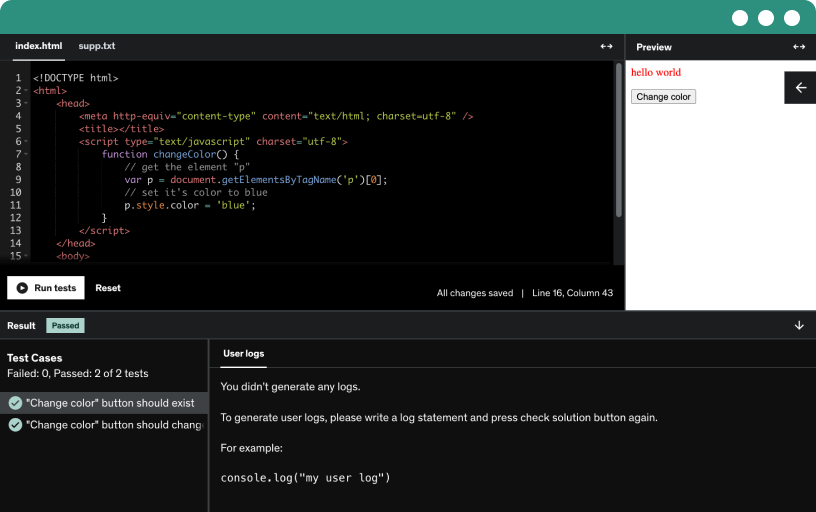
Course content
34 sections • 441 lectures • 29h 7m total length
Requirements
- No previous AI, machine-learning or Claude Code knowledge is required. AI concepts are introduced from the foundations.
- Experience building a small application in a programming language and framework. Be comfortable reading code, debugging, running tests and using basic Git commands.
- For the main project, be able to follow React components and state, TypeScript, Node APIs and basic SQL. Refresh unfamiliar basics as needed; these technologies are not taught from scratch.
- A computer on a currently supported Windows, macOS or Linux version, reliable internet, and permission to install development tools. You will use an editor, terminal, browser, Git and the project runtimes; no special AI GPU is needed.
- Access to Claude Code is required for hands-on AI practice. Budget for a supported paid subscription or usage-based access; tool charges are separate from the course fee. Check current access and feature requirements before purchasing.
- A GitHub account is needed for the repository and GitHub Actions activities. Setup and project-specific version instructions are supplied in the course.
- Codex, GitHub Copilot, Spec Kit and the .NET, Java and Python clinics are optional. Use only the accounts, tools and familiar language environments needed for the clinics you choose; additional provider charges may apply.
Description
Learn to use Claude Code across the complete software development workflow. Turn a requirement into a plan, make changes in a real codebase, test the result and explain why it is ready for review. Build your skills in prompt engineering, context engineering and agentic coding through connected projects, visual explanations and independent practice.
You already know how to write software. Now imagine asking an AI assistant to change an approval rule. Which files should it inspect? What happens to the interface, API, database and tests? How will you know that the change is correct?
Those are the decisions we will practise together.
Why should I enroll in this course?
This course gives you a structured path from your first Claude Code session to larger engineering workflows. Each tool connects to a development problem you can recognize.
See the whole workflow. Follow requirements, architecture, implementation, testing, debugging, code review, delivery and maintenance as connected activities.
Work in an application that keeps growing. Return to the same business system as features, constraints and requirements change.
Develop your own judgment. Try exercises before opening the hint or solution, inspect generated changes and decide what the evidence supports.
Build habits you can reuse. Practise clear task briefs, repository instructions, manageable changes, independent checks and useful handoffs.
Prepare to explain your work. Use interview scenarios and mock interviews to discuss your decisions, tradeoffs and verification.
I'm new to AI. Can I follow this course?
Yes. We assume programming experience, but no previous AI knowledge. The opening sections explain AI, large language models, coding assistants and agents in plain language, using visual examples connected to software development.
Already familiar with the AI basics, or eager to begin with practical work? You can start at Section 4, set up Claude Code and work through your first focused repair. Return to the foundation lessons whenever you need them.
As the course progresses, we introduce new ideas before using them. You will learn what tokens, context windows, retrieval, memory and agent tools mean for the task in front of you.
What will I actually build and change?
You will work with WorkOps, a supplied request-and-approval portal built with React, TypeScript, Node and PostgreSQL. Explore its repository, trace a request through the application, and then implement and verify changes across the interface, API, data and business rules.
The project gives us useful development situations: an approval boundary needs clarification, an error message needs a recovery path, a screen displays stale information, or a service behaves differently when a request times out.
Before watching the solution, pause and predict the result. What should happen at the boundary? Which user is allowed to act? What test would fail if the implementation were wrong? Then make the change, run the checks and compare your reasoning with the walkthrough.
How do I get useful results from Claude Code?
Start with a clear task. You will practise prompt engineering with goals, examples, constraints and acceptance criteria. Then use context engineering to find and supply the code, documentation and decisions the assistant actually needs.
We will explore unfamiliar repositories, manage context limits, maintain project instructions and preserve useful session handoffs. Retrieval and RAG concepts help explain how relevant information is found and why its source still needs checking.
With spec-driven development, you will turn ambiguous requests into testable examples and implementation plans. Ask the assistant to identify uncertainty, challenge unnecessary dependencies and divide work into changes you can review.
What if the code looks right but behaves incorrectly?
That is where your engineering judgment matters. You will use AI assistance for frontend and API work, data changes, test design, debugging and pull-request review while checking the actual application behavior.
Practise test-driven development (TDD) and acceptance test-driven development (ATDD). Investigate tests that pass for the wrong reason, check boundary and denial cases, reproduce bugs and use evidence to distinguish competing explanations.
Later lessons extend these habits to legacy code, refactoring, dependency upgrades, performance and reliability. A passing test is useful evidence; you will also learn to ask what it did and did not check.
How far do the agentic coding workflows go?
Once you can review a focused change, you will practise delegating larger tasks with clear boundaries, progress evidence, usage limits and stop rules. Learn to recover when an agent gets stuck or follows an unhelpful direction.
You will work with skills, hooks, plugins and existing Model Context Protocol (MCP) connections, then explore subagents and parallel work with isolated worktrees. Define responsibilities, review each result and check how the pieces behave when combined.
Will we cover security, CI/CD and enterprise workflows?
Yes. DevSecOps and agent security lessons cover generated-code risks, dependencies, secrets, permissions and untrusted instructions. You will examine where guidance helps and where an enforced control or human decision is needed.
Continue into AI-assisted DevOps, GitHub Actions and CI/CD review, then practise deployment, incident investigation and recovery in controlled local or sandbox environments. The capstone brings repository investigation, specifications, implementation, verification and release decisions together.
For team adoption, you will design evaluations and pilots that consider quality, review effort, cost and useful outcomes. Enterprise scenarios address roles, operating agreements and approval responsibilities.
Is Claude Code the only tool? What if I use another language?
Claude Code is the main tool throughout the course. Optional clinics let you practise selected workflows with Codex, GitHub Copilot and Spec Kit. Tool comparisons, including Cursor, help you understand different approaches; the detailed main project follows Claude Code.
Optional .NET, Java and Python labs help you transfer the method into another stack you already know. Choose the labs relevant to you. You do not need every language environment or every optional tool subscription.
How much will I get to practise?
The 34-section learning path includes focused exercises, applied quizzes, assignments, worked solutions and a capstone. Supplied source code, project checkpoints and reference materials help you revisit a stage and continue from there.
Try a task independently. Use a hint when you need one. Compare your approach with the solution and explain the differences. Getting stuck gives you something specific to investigate, and a useful next question to ask.
The final section adds interview preparation and three mock interviews at increasing levels of difficulty. Practise explaining what you would inspect, what you would change and what evidence you would need before accepting the result.
What should I know, and do I need paid tools?
Bring experience reading and changing code, using basic Git, debugging and running tests. For the main project, you should be able to follow React components and state, TypeScript, Node APIs and basic SQL. Refresh particular gaps as needed; the course builds on existing programming and framework skills.
You will need a supported development computer, reliable internet and access to Claude Code for hands-on AI practice. Budget for an appropriate paid subscription or usage-based access. Tool charges are separate from the course fee, and some integrations have their own account or feature requirements. Check the current setup guidance before purchasing. No special GPU is needed.
The focus is using AI to develop and maintain software. Building chatbot applications, training models and implementing custom RAG infrastructure or MCP servers are outside this course's scope.
Think of one development task you would like help with. By the end, you will have practised a repeatable way to describe it, guide the work, test the result and explain your decision.
Keep your editor ready. Let's start with a small change and build from there.
Who this course is for:
- Software developers who already write code and want a structured, practical way to use Claude Code throughout the development lifecycle, starting with no AI background.
- Frontend, backend and full-stack developers who want to plan, implement, test, debug and review AI-assisted changes in a connected application.
- Developers already using AI coding tools who want stronger prompts, better context, repeatable workflows and evidence they can use to accept or reject generated changes.
- QA and automation engineers who write code and want to apply AI assistance to test design, failure investigation and regression prevention.
- Technical leads, architects and hands-on DevOps engineers who want to evaluate agent workflows, security controls, CI/CD integration and team adoption.
- Developers preparing for technical interviews who want practice explaining AI-assisted engineering decisions, tradeoffs and verification through realistic scenarios.